



If you experience problems with your order after the order status changes to shipped*, such as the product not matching the description information, the quantity not matching, or other problems that make you feel disadvantaged, you can submit a complaint. Order Complaints If the order status has changed to Shipped for more than 3 minutes, the system will automatically hold the balance and not immediately forward it to the Seller.
The following are the steps for submitting a complaint:
- Click the button Complaint Submission available in the order details

- Select the problem you are experiencing
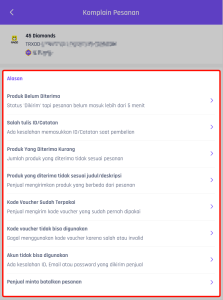
- Click Upload Proof and select the screenshot or video file in-game which shows that your order has not been received
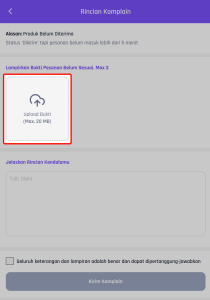
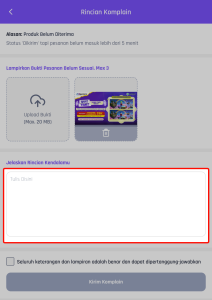
- Write the details of the problem briefly and clearly.
- Check the point "All information and attachments are correct and can be accounted for" then click the "Send Complaint" button.
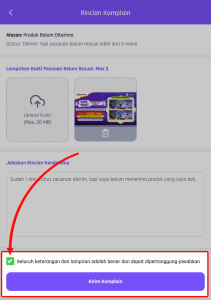
- Please double check that the product has not yet been received. If not, press the button Submit a Complaint
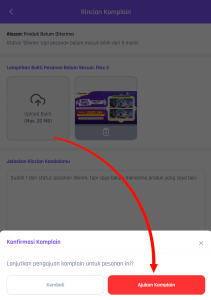
- You'll be directed to the complaint chat window. Wait for confirmation from the seller and check regularly for updates.
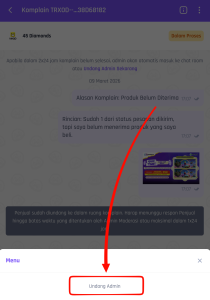
- If you need further assistance from the Admin, press the 3 dots button in the top right corner of the moderation chat window.
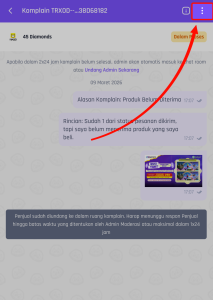
- Then press the button Invite Admin
Additional information:
- Admin will join automatically, if the problem is long and/or unresolved.
- Buyers can only respond to moderation when the moderation chat status is “Waiting for buyer response”.
- If the order status is complete or the buyer confirms receipt of the order, the balance will be immediately forwarded to the seller so that complaints/moderation can no longer be submitted.
- If your order experiences problems after the delivery status in the system changes to Order Completed, you can complain to the seller via the available chat feature regarding the problems you are experiencing.
- If you have already received the order while the complaint is ongoing, you can press the Resolve Complaint button so that the balance can be forwarded to the seller.
Notes :
- Make sure you have checked your order correctly before pressing the Order Received button.
- Never confirm that an order has been received if you have not received the order validly.
- Problems experienced after the buyer confirms receipt are beyond VCGamers' responsibility.
- If you experience problems during the complaint process, please contact us via email [email protected] so that your problem can be followed up immediately.