



To use your Buyer Balance and Points, you need to verify your mobile number. Every transaction using your Buyer Balance or Points requires a PIN for account security. For more information, please read the FAQ. How to Activate Buyer Balance and Security PIN.
Here's how to activate Buyer Balance and Points:
- You can activate in several places:
- Open the main page VCGamers with the login state, then click on the section Buyer's Balance
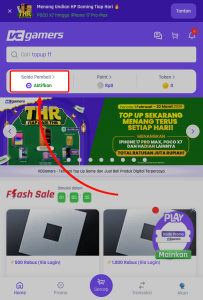
- Open the Account page while logged in, then click on the section Buyer's Balance
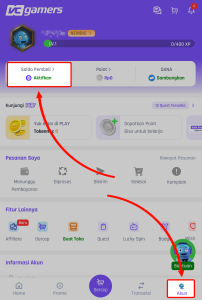
- Open the Account page while logged in > Settings > Edit Profile > Fill in the fields Mobile phone number > Click Save
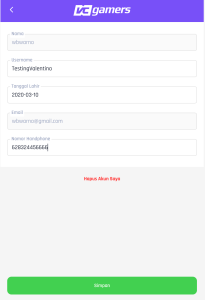
- Open the main page VCGamers with the login state, then click on the section Buyer's Balance
- Enter your active mobile phone number on WhatsApp (don't enter the prefix 0 or 62)
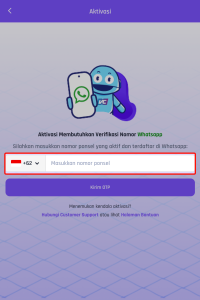
- Click the button Send OTP
- OTP will be sent to the number you wrote via WhatsApp
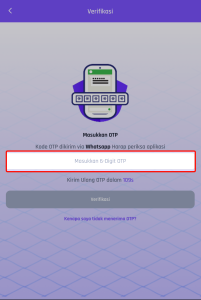
- Enter the OTP you received then click the button Verification
- You will be directed to create a PIN
- Follow the steps to create a PIN correctly
*Notes :
- Do not share your Buyer Balance PIN with anyone for any reason. VCGamers will not ask for confidential personal data, such as verification codes (OTP) sent via Email/SMS/WhatsApp, passwords, PINs and credit card CVV codes or send links that direct you to other sites. If you find anything suspicious, don't hesitate to inform us via Whatsapp Official we.
- If you want to change the PIN you have created, you can refer to Change Account Security PIN.
- If you forget the PIN you have created, you can refer to Forgot Account Security PIN.