

- Feature Affinity in Mobile Legends shows the level of closeness between players and provides benefits when points are sufficient.
- There are four statuses: Partner, You, Friend, and Right-hand man to show relationships.
- To open the status required minimum 150 points Intimacy; increase it by playing together and sending each other gifts.
- Benefits: show relationships in profile and share hero pool while playing mode Classic or VS AI.
ML Affinity: Definition, Status Types, and How to Increase Points
For those of you who often mabar in Mobile Legends, The term affinity is probably already familiar. This feature allows players to indicate their level of closeness with friends through several relationship statuses, such as Partner, Sibling, Best Friend, and Confidant.
Affinity in Mobile Legends It's not just a social feature, as players can also gain certain benefits after reaching the required number of familiarity points. One of these is the opportunity to share hero pool when playing in Classic or VS AI mode with friends who have affinity.
Also read:
- How to Customize the ML Loading Screen, Change the Appearance Yourself
- 30 List of Cool and Glowing ML Avatars
- ML Ranking Order From Most Complete to Most Complete, Along with Its Philosophy
What is ML Affinity?

Affinity (Affinity) in Mobile Legends is a social feature used to indicate the level of closeness between players. This feature is suitable for those of you who frequently play with friends, partners, or significant others on the same team.
To unlock affinity status, players need to accumulate at least 150 intimacy points. These points can be earned through various collaborative activities, including playing on a team and sending each other friendship points. gifts or in-game prizes.
Once you meet the requirements, you can determine the type of relationship you want to display with other players. In addition to displaying these relationships in your profile, affinity also allows players to share hero pool when playing Classic or VS AI mode.
So, if you often mabar with the same person, ML's affinity feature can be a simple way to show how close your relationship is in-game.
Affinity Status Types
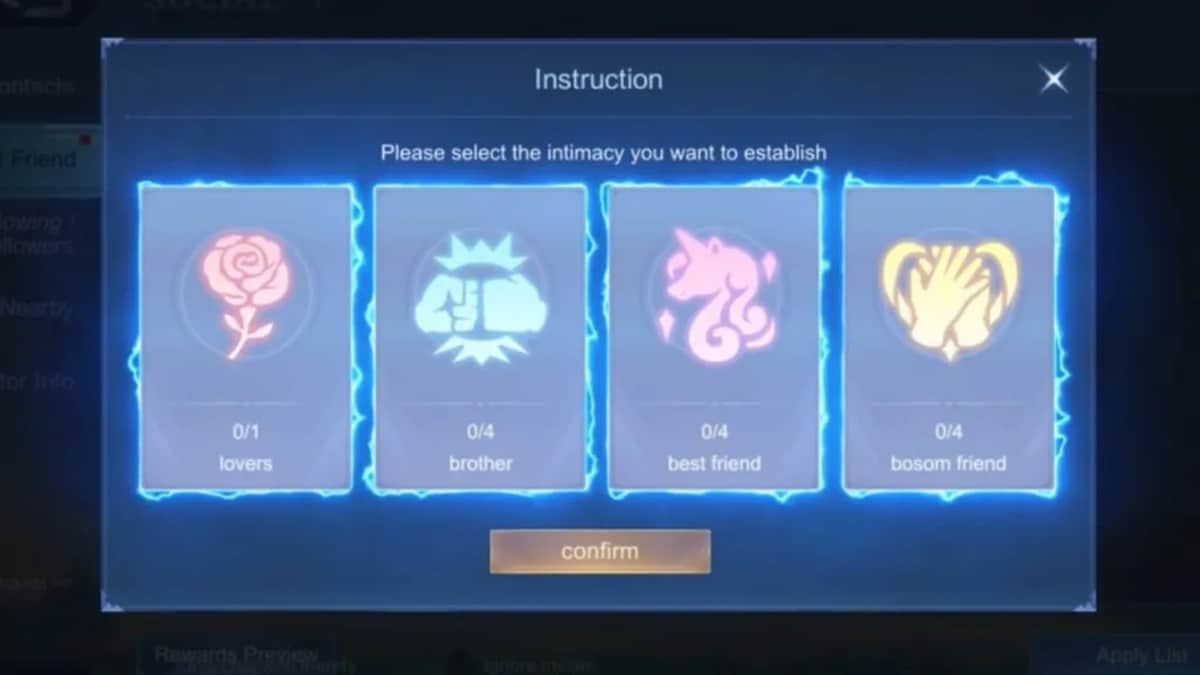
Mobile Legends offers four types of affinity statuses for players to choose from. Each status has its own meaning and is suitable for different relationships.
Partner
The Couple status is intended to indicate a special relationship between two players. This status is typically chosen by players who are playing with a boyfriend or girlfriend, partner, or someone they consider to have a special relationship with in-game.
Besides signaling a more personal relationship, the Couple status can also be a way to make your Mobile Legends profile look more unique. You and your partner can build camaraderie by regularly playing on the same team.
You
The Siblings status describes a close relationship, like a brother and sister. This status doesn't have to be for siblings, but can also be used when you have friends who feel like family.
For long time players mabar and helping each other while playing, the Siblings status could be a fitting choice. This relationship demonstrates a closer bond than just casual playmates.
Friend
The Friend status is suitable for friends who frequently accompany you in playing Mobile Legends. This relationship usually develops through intense interaction. mabar high, frequent communication, and cooperation that has been formed in the match.
If you have a friend who is almost always invited push rank, Whether you're playing Classic, or simply filling your free time, Friends status can be a great option. The more you spend time together, the more your friendship points will increase.
Right-hand man
Confidant describes a friendship based on mutual trust. This status is suitable for friends who frequently serve as teammates and can be relied upon during matches.
You can choose this status for players who understand your playing style or frequently help out when the team is in difficult situations. This way, affinity not only indicates friendship but also demonstrates a close working relationship.
How to Increase Affinity Points

There are several ways to increase your intimacy points and unlock this status. They're quite simple, as they relate to typical activities while playing Mobile Legends.
Play together
The easiest way is to play together or mabar on a team. The more often you play with the same friends, the greater your chances of building rapport and accumulating points based on the in-game activities.
Send each other gifts
Besides playing together, you can also send items to each other. gifts or in-game prizes. These activities can help increase your familiarity points with other players.
Collect at least 150 points
Before you can unlock affinity status, you need to accumulate at least 150 intimacy points. Once you reach this number, you can choose the appropriate relationship status with that friend.
By understanding what ML affinity is, the types of statuses, and how to earn points, you can make the most of Mobile Legends' social features.
Also read:

- How to Check Your ML Credit Score and Increase It Easily
- Top Up Your Game Using Promo Code PASTIKESBEK and Get 10K Cashback
- The First Hero You Get in MLBB
This feature also makes activities mabar It feels more personal because relationships with friends can be displayed directly through in-game profiles.
FAQs
This feature is used to show the level of closeness and relationship between players.
Players need at least 150 intimacy points.
There are Spouses, Siblings, Friends, and Confidants.
Points can be earned by playing together and sending each other gifts.
Yes, players can share certain hero choices when playing in supported modes.
MLBB Product Recommendations


 BV2SHOP
 DEMPET STOREBV2SHOPBV2SHOP
 TopMur
 RudyStorezBV2SHOPBV2SHOPTopMurBV2SHOP




 News
News




