
- Advanced Servers Mobile Legends: a dedicated server for trying out new content (heroes, modes, skins); try free heroes and report bugs for rewards.
- How to enter: open Profile, Account, Advanced Servers; minimum account requirements level 15, connection <120 ms, limited slots (~40,000), usually open 24 hours a day Thursday.
How to Enter Advanced Server ML and Its Features
The Advanced Server is a server with the latest Mobile Legends or ML features that are not yet on the main server. Apart from features, this Advanced Server also has its own rules and ways to play, different from the main server.
Through this article, we will discuss the features, how to enter, and the rules in the Advanced Server. What are you curious about? Come on, see the discussion below!
Also read:
Advanced Server ML features

Advanced Server is a server available to players Mobile Legends who are enthusiastic about trying new content by Moonton.
This content is not only in the form of new heroes, but you can also play various game modes that might be held for the main server in the future.
The main server and Advanced Server do not have a big enough difference. The main difference between the two servers is a feature that is missing on the main server.
Therefore, players who are enthusiastic about this content certainly want to try new features that are not yet available on the main server.
Apart from the recently released features, other features are quite the same including gameplay. The gameplay available on this server is actually quite similar to that of the main server.
For example, you can play Unranked mode after completing Tutorial mode. After that, you can only play Ranked mode after reaching level 8 like the main server.
However, there are features that are more profitable for players who enter the Advanced Server. This feature is free to try new heroes that will be released.
Finally, you can earn rewards when playing on this server! To do this, you must first find a bug and report it to the game's administrators. Moonton.
How to Enter Advance Server ML
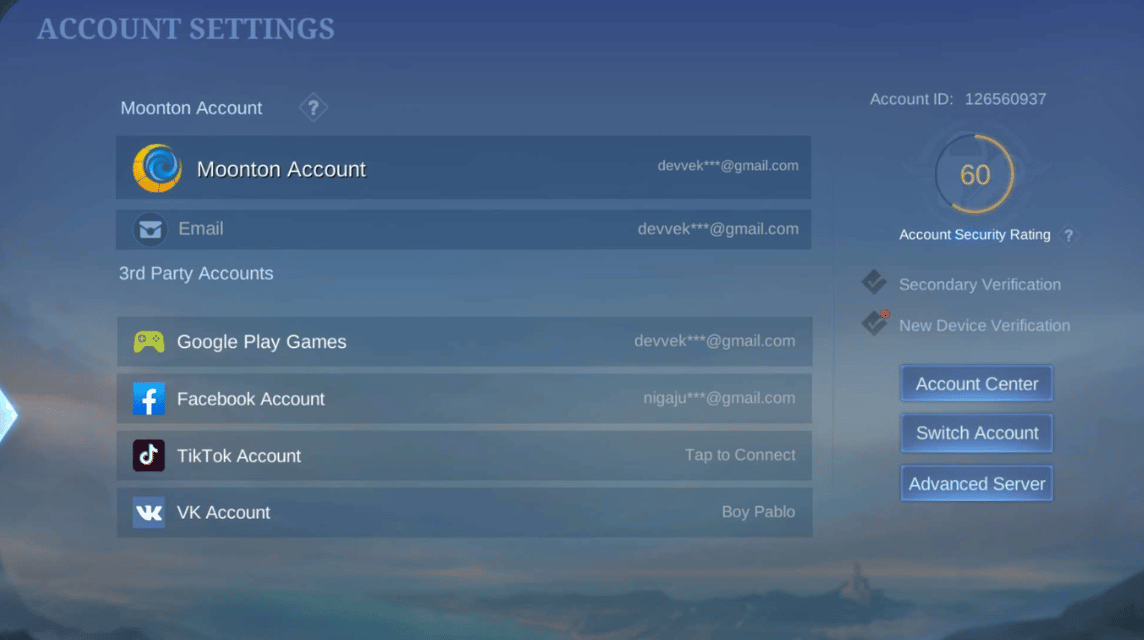
There are ways that you can follow to enter Advance Server ML. Following are the steps:
- Open the Profile menu at the top left of the screen.
- Select the Account menu at the very bottom of the Profile menu.
- You will see the Advance Server option at the bottom right of the Account Settings menu.
- Select the Advanced Server and see server availability.
That's how you can enter the server. However, there are rules that you must follow so that you can enter the server.
The rules or requirements are quite easy, you know! If you are curious, let's see the discussion about the rules that you must follow below!
Advance Server Rules
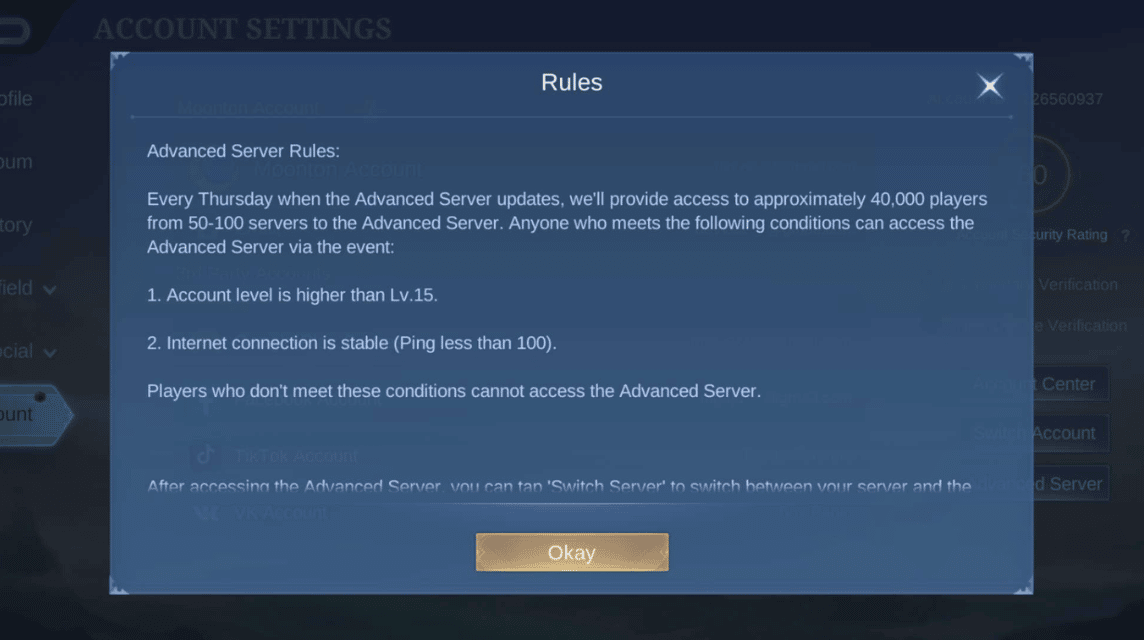
There are separate rules that you must follow. Every Thursday, there will be an update available by Moonton. Therefore, the server will be open to around 40,000 players from 50 to 100 main servers.
You must first reach level 15 on the main server and must have a stable internet connection, less than 100 Ping.
If you haven't reached level 15 and have a Ping over 100, then you can't enter the server even though the quota of 40,000 players hasn't been met.
Also read:
Thus the discussion regarding Advanced Server in Mobile Legends, may be useful!

FAQ About Advanced Server Mobile Legends
The Advanced Server is a dedicated server provided by Moonton for testing new content before its official release on the Original Server. This includes new heroes, skins, battlefield adjustments (buffs/nerfs), and other experimental features.
New Content: You can try the latest heroes or updates faster.
New Account: When you first log in, your account will start at level 1 (not using your main account progress), but you will usually be given resources such as Diamonds/BP for testing.
Separate Progress: Anything done on the Advance Server (rank, items, skins) will not affect or carry over to the Original Server.
Data Reset: Data in Advanced Server can be reset or deleted at any time by the developer.
Your main account must be at least level 15 or higher.
Have a stable network connection (latency <120 ms).
Slots are limited, so not all players can enter immediately.
Open the Mobile Legends app and log in to your main account.
Go to the Profile menu (top left corner).
Select Account Settings.
Look for a button or option that says Test Server or Switch Server at the bottom.
If a slot is available, you'll be prompted to download additional data. If not, you'll have to wait for a slot to open (usually on Thursday).
MLBB Product Recommendations


 BV2SHOPBV2SHOPBV2SHOP
 DEMPET STORE
 TopMurBV2SHOP
 RudyStorezTopMurBV2SHOPBV2SHOP



 News
News





I
I would love to enter
I want to enter immediately
I want to play ml
I want 9999 DM moba for free
great
I want 999999 dm moba free
i just want to play
I want DM 9999
Thanks for
I hope you can give me an advance server account because I'm having trouble recharging and I'm wasting a lot of money because what I like about the advanced server is a lot of diamonds, thank you.
My account is playing ml
Want to follow the server