

- Avatars in Roblox is a customizable digital face: clothes, accessories, animations to show style and interaction.
- R6 vs R15: R6 is simple and light; R15 is smooth and flexible, choose according to your device and expression needs.
- Login, open menu Avatars, select an item or search in Marketplaces; use themes, limited color combinations, save and update regularly.
How to Easily Create a Roblox Avatar, Perfect for Beginners
If you play Roblox often, you're probably familiar with the term Roblox avatar. Yup, this is your "digital face" in the game. cool games This. Want to look cool, funny, weird, or even eccentric? You can customize it all with your avatar.
Interestingly, the icon on Roblox It's not just about appearance. It's also a crucial part of the gaming experience, from interactions to your playing style.
So, in this article, we'll thoroughly discuss how Roblox icons work, their types, and how to create your own unique avatar. Relax, the discussion is light, so you won't get overwhelmed like watching Nvidia's stock price fluctuate.
Also read:
- 40 Roblox Avatar Photo Ideas for Girls and Boys, Really Cool
- 40 Coolest Roblox Avatars for Boys and Girls
- 5 Cute Roblox Avatar Recommendations for Girls
How Roblox Avatars Work

Every Roblox user is represented by a customizable character called an avatar. This avatar is a character model with many special features, allowing you to interact with the game world and customize your appearance to your liking.
In simple terms, a Roblox avatar works like your “digital clothes and body.” When you log in and enter a games, the Roblox system will immediately display the avatar you created previously.
You can:
- Change clothes
- Add accessories (hats, glasses, etc.)
- Changing faces and animations
- Adjust body shape (depending on avatar type)
You can get all of these items from the Roblox Marketplace. Some are free, while others require a fee. Robux.
Interestingly, this avatar can also reflect your personality. Some prefer a minimalist look, while others are so full of accessories that they look like a walking wardrobe. It doesn't matter, as long as you're comfortable.
Speaking of customization, the concept is actually similar to investing: you choose the best assets to "value" your appearance. The difference is, it's not about the price of a package or buying gold, but about the style to make your avatar even more unique. standout.
Roblox Avatar Types

In Roblox, there are two main avatar types you should know about: R6 and R15. Both have significant differences, especially in terms of animation and flexibility.
R6 (Classic & Vintage)
R6 is an older version of the Roblox icon. Distinctive features:
- Consists of only 6 body parts: head, body, 2 arms, and 2 legs
- Stiff and simple animation
- Limited movement
Even though it looks old school, there are still many players who like R6 because:
- Lighter (suitable for potato devices)
- Nostalgia
- Simpler and less complicated
R15 (Modern & Flexible)
The R15 is a more modern and sophisticated version. Its characteristics are:
- Consists of 15 body parts
- Smoother and more realistic animations
- Can use various poses and emotes
The R15 is perfect for those who like detailed and expressive looks. You can even create an avatar that looks like an anime character, a superhero, or even a regular person (although the latter is rarely chosen).
If you compare it to an old-school, rugged smartphone, the R6 is like a secure crypto app with comprehensive features, a modern look, and more flexibility. You just have to choose according to your needs.
How to Make Your Own Roblox Avatar
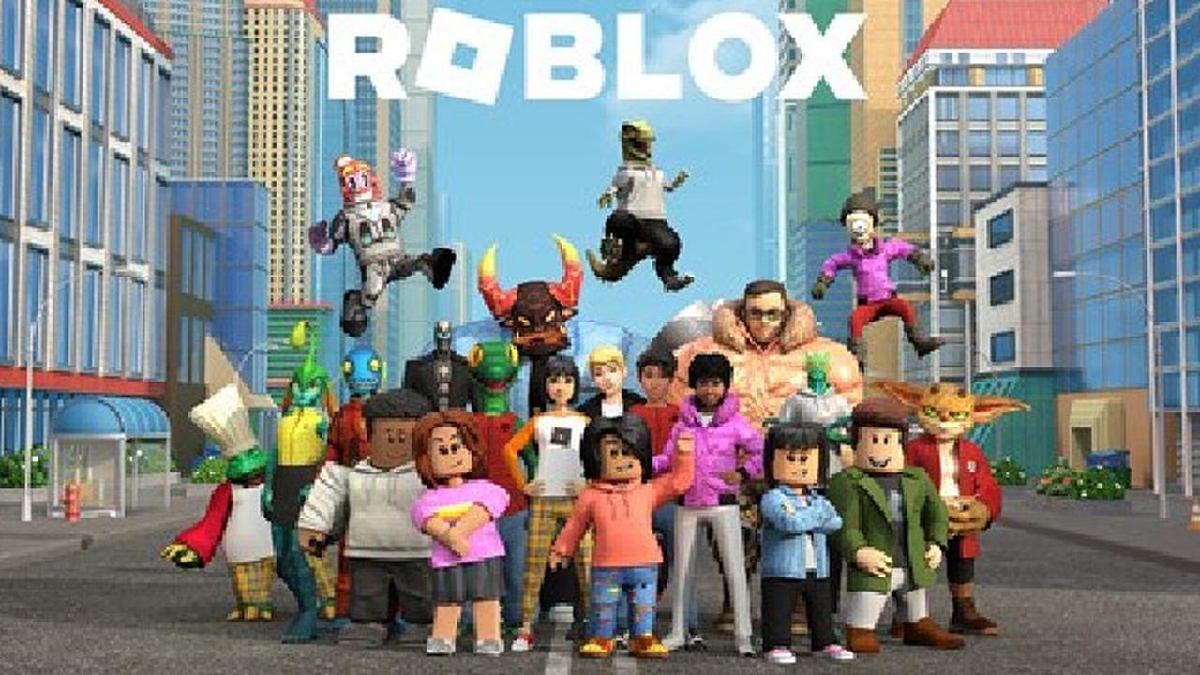
Now onto the most exciting part: creating your own Roblox userpic. Don't worry, it's not complicated. Even beginners can try it right away.
Login to Roblox Account
First, make sure you are logged in to your game account via the website or application.
Enter the Avatar Menu
Click menus Avatars On the dashboard, you can see your current character.
Select and Replace Items
You can start organizing:
- Body (body shape, skin color)
- Clothing (shirt and pants)
- Accessories (hat, hair, etc.)
- Animation (walking style, jumping, etc.)
Just click on the item you want, and your avatar will change immediately.
Visit the Marketplace
If you want a wider selection, you can visit the Marketplace, where thousands of cool items are available.
Tips:
- Use the “Free” filter if you don't want to lose Robux
- Look for unique items to make your avatar different from others.
Save and Use
Once completed, your avatar is automatically saved and ready to use in all Roblox games.
Tips to Make Your Avatar Even Cooler

To prevent your Roblox icon from looking plain (or worse, like the default new player icon), here are some simple but effective tips you can try:
Determine Avatar Theme
Don't just throw everything together. Try to define a concept first, for example:
- Ninjas
- Streetwear
- Futuristic
- Anime style
With a clear theme, your avatar will look more “intended” and pleasing to the eye.
Don't Wear Too Many Accessories
It's tempting to wear everything, but the result can be too busy. Remember, sometimes simple is cooler. If you're already wearing a hat, glasses, and wings, don't add horns, or it'll look like a failed cosplay.
Pay Attention to Color Combinations
Color is very important. Avoid colors that clash too much (unless you're really trying to be eccentric).
Easy tips:
- Use a maximum of 2–3 main colors
- Choose colors that are similar or contrasting but still pleasing to the eye.
Use Appropriate Animation
If you use an R15 avatar, take advantage of the animation features:
- Casual walking style
- Cool jump
- Unique idle pose
This animation makes your avatar more alive and not stiff like a statue.
Find Unique Items in the Marketplace
Don't just use the same old items. Try exploring the Marketplace and looking for items that other people rarely use. Who knows, you might find a rare item that will make your avatar stand out from the crowd.
Update Regularly
Trends in gaming also change. Sometimes styles that were once cool are now just commonplace.
So, update your avatar every now and then to keep it fresh and up to date.
Your Roblox userpic isn't just a character. It's a representation of you in the virtual world, customizable to your liking.

Starting from how it works, types of avatars such as R6 and R15, to how to create them, everything provides freedom to express yourself.
Also read:
- ID Best Woman Face for Roblox Avatar
- Cool Roblox Avatar Ideas Recommendations
- Latest Funny Roblox Avatar Recommendations
With a little creativity, you can create a unique and instantly recognizable avatar. So, are you ready to create your best Roblox avatar yet? Don't let your avatar lose out to other players!
FAQs
A Roblox avatar is simply called an avatar. It's a digital character that represents you in the Roblox game. You could say this avatar is a "virtual version" of you while playing.
A Roblox avatar is a character that represents each Roblox user. So, each player has their own avatar, which can be customized to their liking, from its appearance to its animation style.
Yes, of course you can. In fact, creating and customizing avatars is one of the main features of Roblox. You can change your avatar's appearance at any time using various items such as clothing, accessories, and animations.
Roblox is an online gaming platform featuring thousands, if not millions, of user-created games. Here, you can play a variety of genres, from adventure and simulation to role-playing and casual games. So, Roblox isn't just one game, but a collection of many games on one platform.
No, Roblox isn't necessarily bad for kids. The platform is safe to use with parental supervision and proper privacy settings. However, because Roblox is an online game, there are still risks, such as interactions with other players, so it's important to remain vigilant.
Roblox Product Recommendations

 Hero Alive
 Kumay10shopHero AliveHero Alive
 RudyStorezHero Alive



 News
News




