
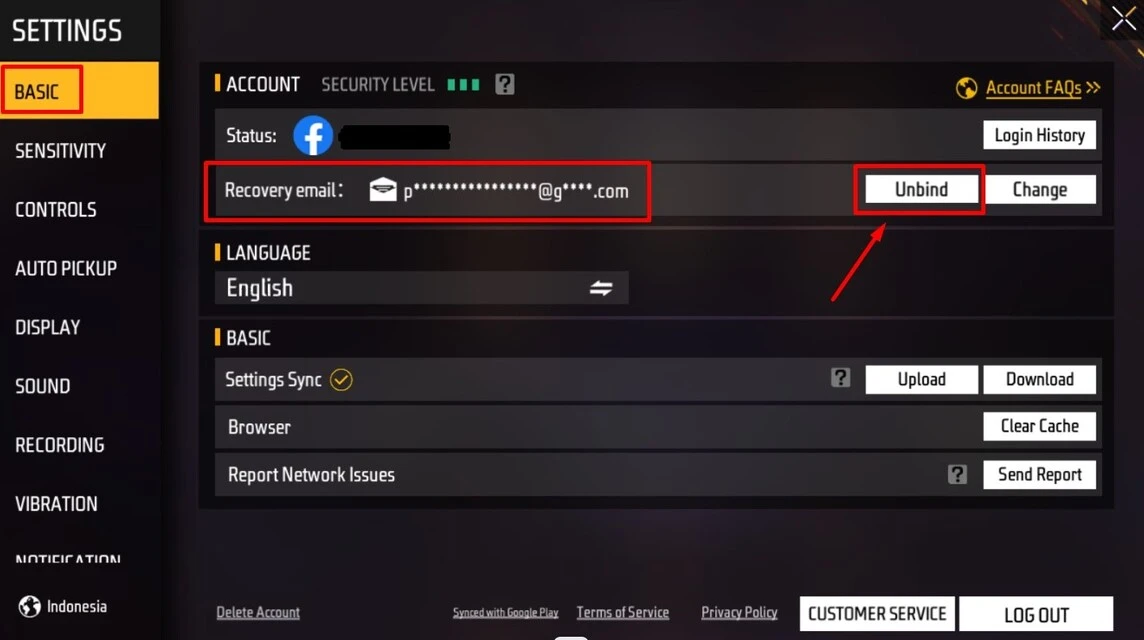
- Unbind FF account via Facebook: Open Arrangement Facebook → Apps and Websites → select Free Fire and remove access to release the link.
- Unbind risk: Deleting the link (Google/Facebook) may result in the loss of account progress; FF accounts cannot be transferred to other accounts according to Garena.
How to Unbind Your FF Account via Facebook and Google: It's Easy!
Currently, many players are looking for ways to unbind FF accounts. This is because you can move accounts Free Fire from one platform to another.
You can do this by moving your account from Facebook login to Google login. Therefore, we need a way to unbind FF so that we can easily switch to other platforms.
Also, usually due to moving accounts from one platform to another. Players often bind because they want to sell their FF accounts. Since the FF account itself is linked to social media accounts such as FB, Google or VK, it must be deleted first.
In this way, all that is being sold is a FF account. Therefore, previously connected social media accounts with Free Fire can be saved.
Also read:
Definition of Unbind Free Fire
Before discussing how to unbind a Free Fire account. We will discuss what bind and unbind actually are in the Free Fire game.
The function of this connection system itself is to maintain the progress of the game you are playing, so you can continue it at any time by logging in.
Connect or bind is useful if you change cellphones and want to reactivate your FF account on a new cellphone. By linking this FF account, we will get a very big advantage.
You will not lose data and game progress even if we delete the game. And if you want to play it again, all you have to do is download the game and log in to the linked account.
On the other hand, deleting Free Fire is a process of canceling access to connect FF accounts with social media accounts. The weakness that can be obtained from this unconnected method is that you risk losing all your data and game progress.
How to Unbind a Free Fire Account via Google

If your Free Fire account happens to be connected to Google instead of Facebook, follow these steps to unlink it:
- Open the Settings menu on your phone.
- Go to the Installed Applications section.
- Search for and open Google Play Services.
- Select the Clear Data option, then agree.
- Open the Gmail application.
- Go to Email Account Settings and select Manage Account Access.
- Find the Free Fire app, then select Remove Access.
- Press OK to confirm.
Once the process is complete, your Google account will no longer be linked to your Free Fire account. While you can still log back in to your old account, there's a chance your account will be lost after the unbinding process.
How to unbind FF accounts via Facebook

Now we come to the main discussion of this article, namely how to unlink or unbind a Free Fire account. Currently there are three platforms that can be connected to a Free Fire account, namely Facebook, Google, and VK.
The author will only tell you how to delete a Free Fire account via FB. Please refer to the steps below;
-
First, log in to the Facebook app with the account connected to Free Fire.
-
After that, open it Menu in the top right corner and select Arrangement. In it, find and open the section Apps and Websites.
-
In the list of connected applications, select Edit.
Check all the applications, then find Free Fire.
Select the game, then press OK. Finally, confirm again by pressing OK.
After successfully opening FF using the process above, there are two possibilities. You can still use the old account to get Free Fire games, or delete the account because it is no longer connected to it.

For Vicigers who is wondering whether the Free Fire account can be transferred to another account? The answer is no! Based on Garena's official website, Free Fire accounts that are connected to Facebook or other permanent accounts.
So you can't move or delete links and connect to Facebook or other social media accounts.
Also read:
So, if unwanted things happen, such as hacking Free Fire accounts, forgetting passwords, and others. You can contact Facebook directly if you use Facebook.
Free Fire Product Recommendations


 TopMurTopMur
 TopMur
 RudyStorezTopMur
 TopMur
 RudyStorez
 RudyStorez
 RudyStorezRudyStorez


 News
News




