

- Template BUSSID provides complete body patterns, making it easy to create precise liveries without having to design from scratch.
- Make your vehicle cooler with various styles livery: racing, anime, tourism, to the popular full strobe concept.
- 50 Template ready to download for many types of vehicles: buses, trucks, pickups, travel cars, and extreme mods.
- How to install: download PNG, edit using PixelLab, canvas, or Photoshop, then install via the menu Garage, Livery, My Files.
10 Latest BUSSID Templates and How to Install Them
One of the most sought after features by gamers Indonesian Bus Simulator is the BUSSID template because it can make the vehicle look cooler, unique, and different from other players.
This template is also often used to create vehicle designs before being made into final liveries.
So, if you are looking for a complete list of BUSSID liveries and how to install them, this article will help you.
Also read:
- Livery Bussid Bimasena SDD Bus Simulator Indonesia
- Recommendations for the Latest Bussid Truck Swerving Mod 2026
- 48 Download Links MOD BUSSID Cool Travel Car
BUSSID Template Function
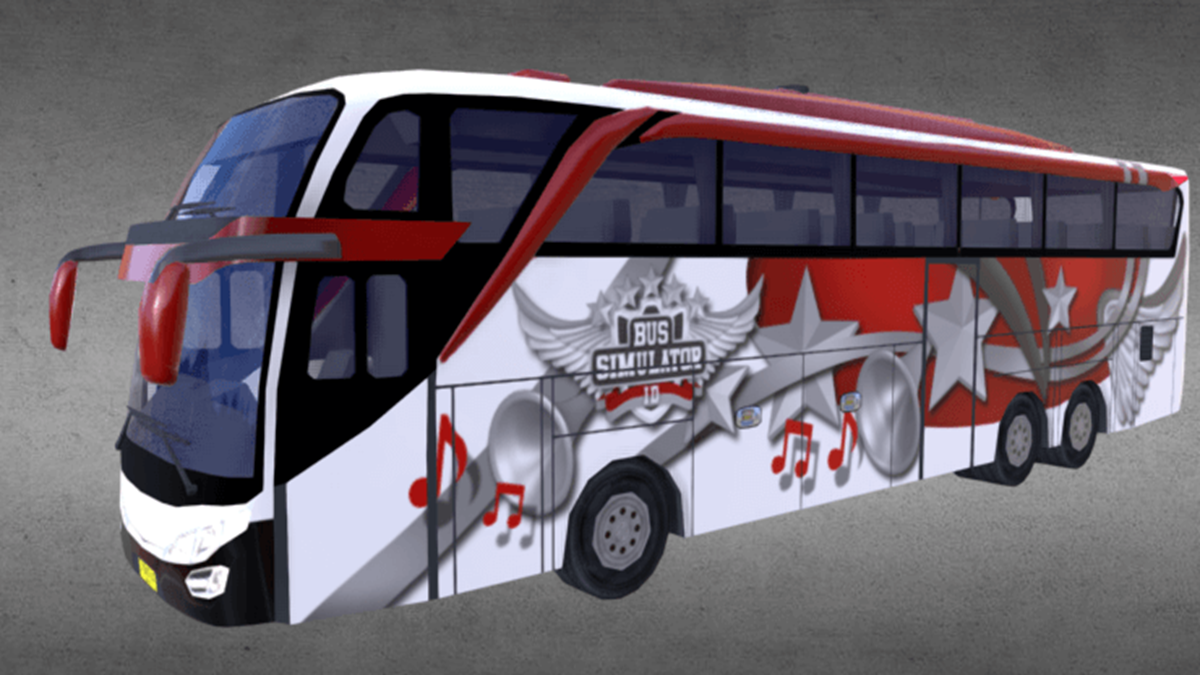
Livery files aren't just ordinary images. They serve many important functions for players who enjoy modifying vehicles in the game. Here are some of their functions you should know.
Helps Make Livery Easier
The BUSSID template makes it easy to create liveries because it already includes complete vehicle body patterns. So, you can simply add colors, stickers, text, or designs to your liking without having to create them from scratch.
Additionally, templates also help with precise design positioning. The final result will look neat when installed on in-game vehicles.
Make Your Vehicle Look Cooler
Many players use livery files to make their vehicles more attractive. With unique designs, your bus or truck will stand out from the game's standard vehicles.
Moreover, now there are many livery files with racing, anime, tourism, and even concept styles. full strobe which is currently popular among players.
Simplify the Editing Process
Livery files are usually the right size for editing. Simply open the file using an application like PixelLab, Photoshop, or canvas then start editing the design.
This makes the livery creation process faster and less complicated, even for beginners.
Can be used for various types of vehicles
This template isn't just for buses; it's also available for many other types of vehicles, from trucks and pickup trucks to touring cars and even extreme modifications.
That's why this template is often sought after by players who like to try various new mods and vehicles in the game.
BUSSID Template Recommendation

Here is a list of templates that you can search for and use to create cool liveries.
- BUSSID 1 > Downloads
- BUSSID 2 > Downloads
- BUSSID 3 > Downloads
- BUSSID 4 > Downloads
- BUSSID 5 > Downloads
- BUSSID 6 > Downloads
- BUSSID 7 > Downloads
- BUSSID 8 > Downloads
- BUSSID 9 > Downloads
- BUSSID 10 > Downloads
How to Install BUSSID Template

If you are still confused about how to install the template, follow these steps.
- Download the BUSSID template you want first.
- Make sure the template file is in PNG format for easy editing.
- Open an editing application such as PixelLab, Canva, or Photoshop.
- Insert the template into your preferred editing application.
- Add designs, colors, writing, or stickers according to your taste.
- Once finished, save the editing results in PNG format.
- Enter the BUSSID game then select the Garage menu.
- Select the vehicle you want to install the livery on.
- Press the “Livery” menu then select “My Files”.
- Find the edited template file and install it on the vehicle.
- Wait for the installation process to complete.
- After that, your BUSSID vehicle will appear with a new design.
Also read:
- 10 Mod BUSSID Truck Fuso 6×4 Heavy Load
- 100+ Most Complete BUSSID Yudistira HD Livery Downloads 2026
- 17 Extreme BUSSID Mod Maps with Severely Damaged Roads, Latest 2026
With so many BUSSID templates available today, you can freely create your own style. From elegant concepts to racing designs to full strobe lights, you can create everything yourself with just a template and a little creativity.
FAQ Template BUSSID
The BUSSID template is a basic vehicle pattern in the Bus Simulator Indonesia game which is used to create liveries or vehicle designs to make them look more attractive and unique.

BUSSID template is usually used to create bus, truck and other vehicle designs in BUSSID.
You can use several editing applications such as Canva, PixelLab, PicsArt, or Photoshop to edit the BUSSID template according to your needs.
Not all templates are suitable for all vehicles. Typically, each vehicle type has a different template, such as SHD buses, Canter trucks, or other modified vehicles.
You just need to edit the template first, then save it in PNG format. After that, go to the BUSSID garage menu, select a vehicle, and install the livery file via the "My Files" menu.
MLBB Product Recommendations


 BV2SHOP
 DEMPET STOREBV2SHOPBV2SHOP
 RudyStorez
 TopMurBV2SHOPBV2SHOP
 AM08SHOPTopMur



 News
News




