
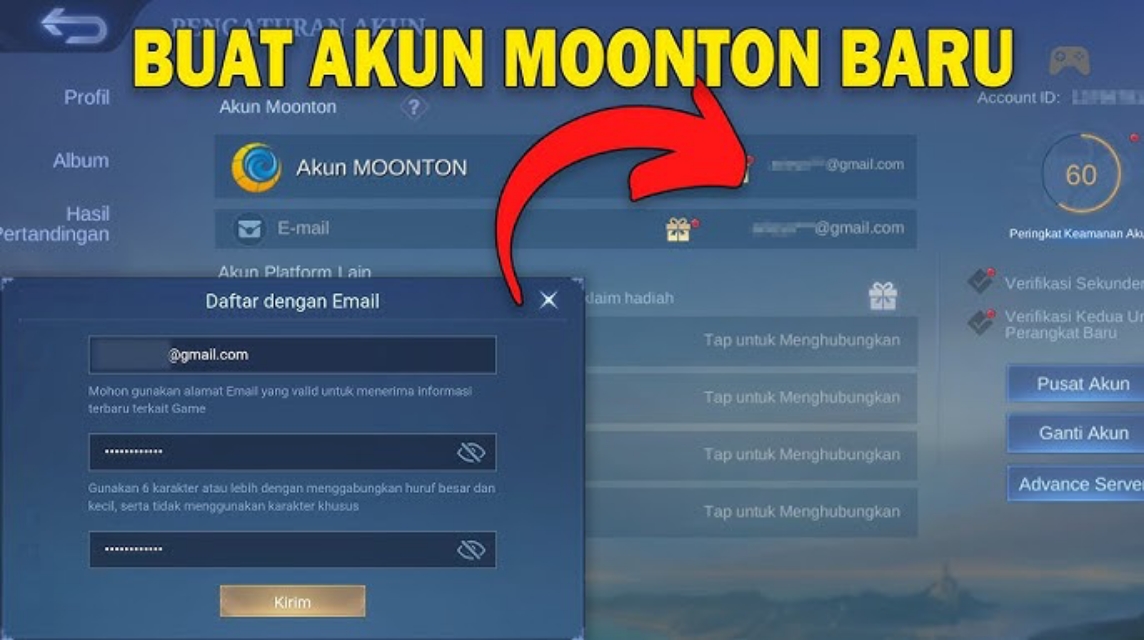
- Connect account Mobile Legends to Moonton Account so that progress (hero, skin, rank) is stored safely and can be restored.
- Register for use active email and complete the code verification to secure the account.
- Save User ID and Server ID for prize claims, CS, and account recovery.
- Add additional binds like Google or Facebook to make account security stronger.
How to Create a Moonton Account Easily and Safely for Beginners
Multiple players Mobile Legends lost the account not because it was hacked, but because it had not been connected to Moonton. In fact, this account is the main key to safely storing game progress, from heroes and skins to ranks.
Without this account, ML data is at risk of being lost when changing phones, resetting the device, or accidentally logging out. Therefore, understanding how to properly create this account is crucial to ensuring your account remains secure. Mobile Legends you remain safe and can be recovered at any time.
MLBB Product Recommendations


 BV2SHOP
 BANGJEFFBV2SHOPBV2SHOP
 TopMur
 RudyStorezBV2SHOPBV2SHOPRudyStorezTopMur
Also read:
- How to Check ID ML Without Logging In, No Hassle
- How to Check ML Account Creation Date
- List of the Latest Free Sultan ML Accounts 2026
What is a Moonton Account for?
For Mobile Legends: Bang Bang players, this game account is a must. It serves as data security. ML account so that it is not lost when changing cellphones, reinstalling games, or logging in on another device.
Apart from that, this MOBA game account also has several important functions, such as:
- Save ML account progress (hero, skin, rank, emblem)
- Make cross-device login easy
- Avoid account being hacked or lost
- Conditions for participating in certain events from Moonton
- Make account recovery easier if you forget your password or your data is corrupted
Without a Moonton account, your ML data is only stored locally. If your phone breaks or the game is deleted, your ML account will likely be irretrievable.
How to Create a Moonton Account

Creating an account is actually quite easy and can be done directly from within the Mobile Legends game. Follow these steps:
Open the Mobile Legends Game
Make sure you are logged in to the ML account that you want to link to your Mobile Legends game account.
Enter the Settings Menu
- Click the gear icon (⚙️) in the top right corner of the screen
- Select the Account menu (Account Settings)
Select Bind Account Option
In the account settings section, select Bind Account or Connect Account.
Select Moonton Account
- Click the Moonton Account option
- Select New Account Registration
Enter Active Email
- Enter an active email
- Make sure your email can receive the verification code.
Moonton will send a verification code to your email.
Verify and Create Password
- Enter the verification code from the email
- Create a Moonton account password
- Passwords should be a combination of letters and numbers to be more secure.
Moonton Account Successfully Created
If all steps are correct, your ML will automatically connect to Moonton.
From now on, your account data is more secure and you can log in on other devices without fear of losing progress.
ID User Settings and ID ML Server
Besides creating a Moonton account, you also need to know the ID user ID and ID server in Mobile Legends. This information is often needed when:
- Claim event prizes
- Contact Moonton customer service
- ML account recovery
- Login to the official Moonton website
How to View ID Users and ID ML Servers
- Open your ML Profile
- Click the profile icon in the top left corner
- Select the Basic Info tab
- There you will see Player ID with a format like:
12345678(1234)
Information:

- The first digit is User ID
- The number in brackets is Server ID
Keep your ID Username and ID Server details private. Don't share your account information with anyone else. Combine your account with additional accounts like Google or Facebook for added security.
Creating a Moonton account isn't complicated, but it offers significant security benefits for your Mobile Legends account. With a Moonton account, your ML data is more secure, less likely to be lost, and easier to recover in case of problems.
Also read:
- Here's How to Play Mobile Legends on a PC Without an Emulator
- Moonton Login: How to Login, Reasons Why You Can't Login, and Solutions
- How to Create an Official Moonton ML Tournament Room
Also, make sure you've noted down the ID Username and ID Server ML ID, as they're often needed for various important purposes. So, before anything happens to your ML account, it's best to secure it now.




 News
News




