- ColorOS 17 delivers a smoother and more stable navigation experience through Luminous Rendering Engine and improvement Trinity Engine.
- Feature AI assisting users' work and activities, while AI Call Guard and Care Mode improve device security.
ColorOS 17 Officially Released, What Features Does It Offer?
Oppo officially released ColorOS 17 globally on October 13, 2026 with the tagline Silky Smooth Flow with AI.
The presence of this new operating system highlights the features of smooth interaction and movement with dynamic lighting that makes user interaction with the system feel more alive.
What other new features does ColorOS 17 offer? Let's find out more in the article below.
Also read:
- OPPO A5 Pro: Specifications, Advantages and Price
- Latest OPPO Phones 2026, from A6X to Find X9 Ultra
- Oppo K Series: Specifications, Disadvantages and Advantages
ColorOS 17 Features
Quoting from the article in OnePlus Community, Oppo wants to make technology feel like something that naturally follows and adapts to its users.
By utilizing artificial intelligence (AI), this new system's primary goal is to help complete various tasks. So, what are the key features that highlight ColorOS 17?
Smoother Interactions With Luminous Rendering Engine
Have you ever experienced the feeling of stuttering when switching between applications? The Luminous Rendering Engine is here to solve that problem.
With the Living Flow Design concept, the system will read the user's intentions and interaction context to make the navigation experience on the user's device feel more dynamic, stable, and intuitive.
In addition, they also made improvements to the Trinity Engine which is responsible for reducing drag (stutter) and reduce the risk of forced closure (forces closed) applications running in the background.
In practical terms, this will help your open apps stay responsive while reducing unnecessary background app closures.
AI That Makes Users' Work Easier
ColorOS 17 brings many improvements to their AI-based features like Mind Space, AI Mind Suggest, Mind Pilot, and OSee.
Mind Space
Have you ever saved a document you might need later and found that the section you need is on page 35?
With Mind Space, AI can remember information and provide it back to the user when needed.
AI Mind Suggest
Your daily routine may require a lot of time to check various information such as weather forecasts, flight schedules, and event reminders on the calendar.
AI Mind Suggest also works like a personal assistant that can provide recommendations and adjust them to the user's preferences.
Mind Pilot
Oppo has also updated Mind Pilot so that it's not limited to just question-and-answer interactions with AI. Now, users can leverage it to help them with their work more flexibly.
There are two modes you can use: ASK and Agent. What's the difference between these two new modes?
ASK Mode allows you to answer short questions from users. You can type or speak and compare responses from multiple AIs simultaneously.
These responses will then be automatically stored in memory, allowing future responses to that topic to generate more relevant answers.
The second mode, Agent Mode, can assist users in completing more complex tasks, such as capturing and organizing photos and files on the device.
In addition, you can also use them to plan and coordinate further execution.
This feature will be extremely useful for those of you who want to create presentations, reports, resumes, and creative images. Simply provide a description of your needs, and Agent will try to create it for you.
OSee
Found a menu in a foreign language you don't understand, a plant you don't know, or a chart that's giving you a headache?
You can use OSee to detect targets, take photos, and provide information and recommendations by reading what you want. This feature can help with the following:
- Document: AI Scanner
- Graphs and formulas: Extract
- Plants and animals: Encyclopedia information
- Food and raw materials: Nutritional analysis
- Foreign language menu: Menu translator
- QR Code: Automatic detection
To make it easier for users, OSee is available at various access points on devices such as Global Search, Shelf, Browser, Camera, Notes, and so on.
The OSee feature can certainly save users time. This is because it allows users to translate text, scan codes, or scan documents all in one place without having to open additional applications.
Security System Enhancement
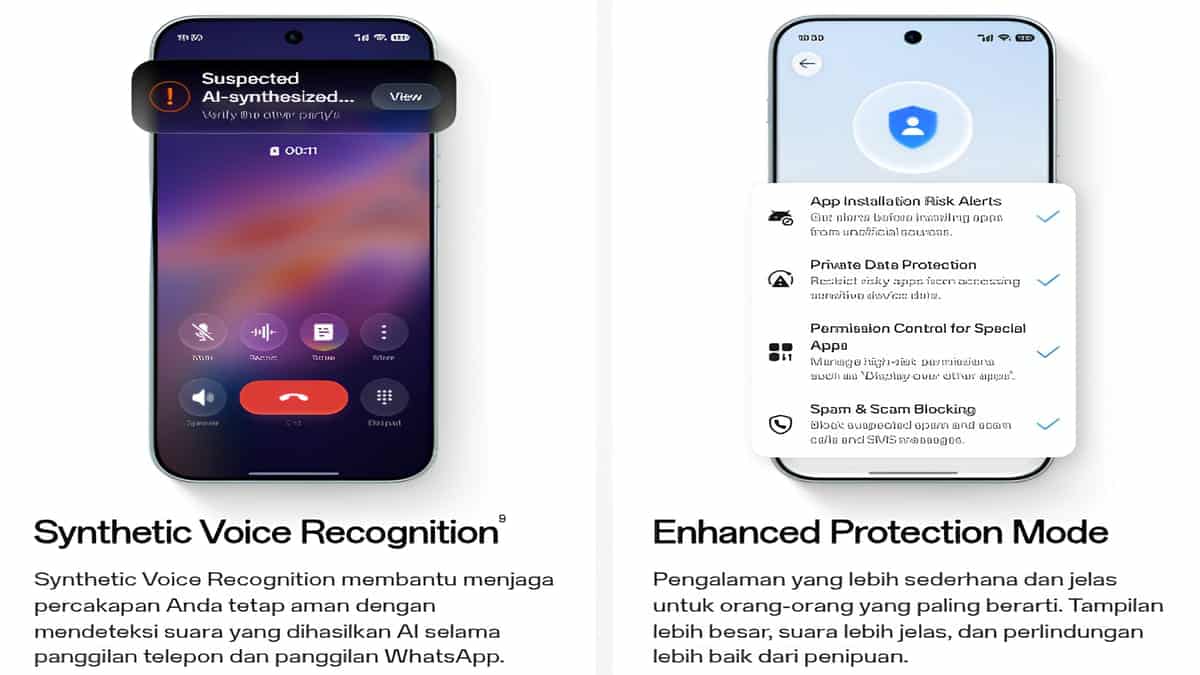
Device security is one of the most crucial aspects for mobile phone users. With so many phishing and scam threats rife, how will ColorOS 17 protect users?
Oppo offers two main features: AI Call Guard and Care Mode. Both aim to detect potential fraudulent activities that could harm users.
AI Call Guard can help users detect incoming calls to their devices. Here are its more complete features:
- Detects whether the caller is using AI to create their voice during a call.
- Detects whether the caller is using AI for filtering faces swapping so that their real faces are not visible
- Analyze potential dangers from calls, browsers, and installed applications.
When the system detects a threat, a notification will appear through Aqua Dynamics and provide an immediate warning so that users can be alert.
Meanwhile, Care Mode offers various useful features such as a larger screen display, security settings, SOS, contact shortcuts, phone navigation using gestures, and so on.
Replacing Simple Mode, Care Mode now automatically activates when you use your device. Its purpose is to provide more convenient and flexible access and control.
Flux Themes: Freedom to Customize Lock Screen
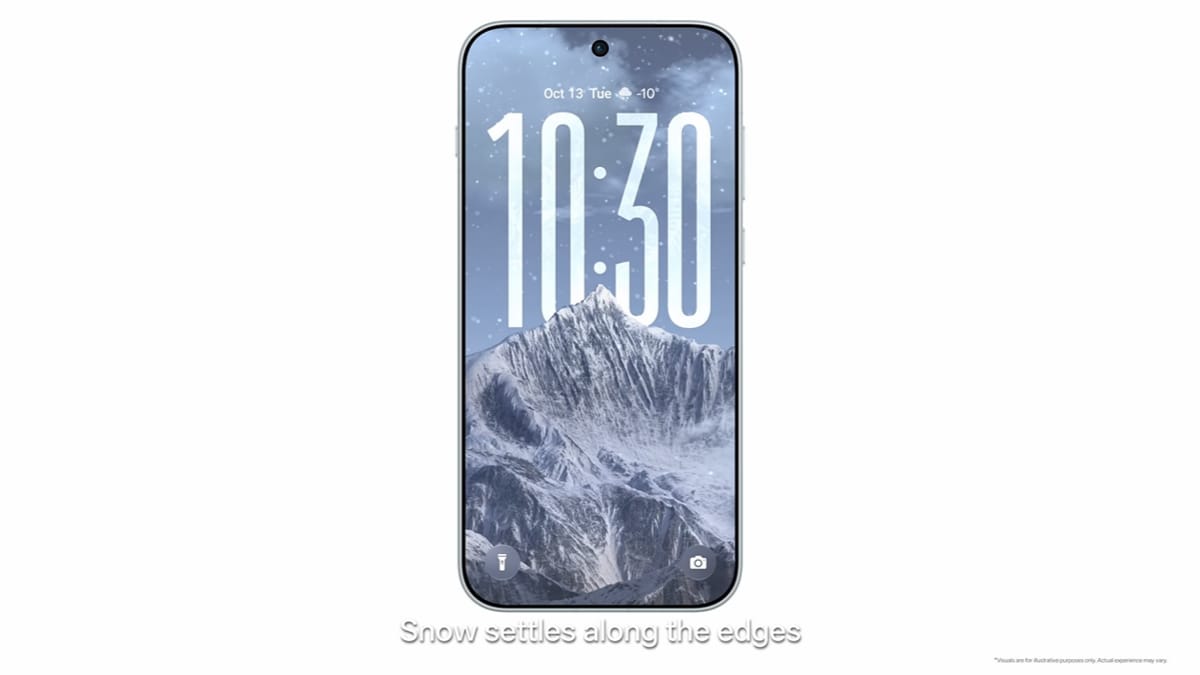
Maybe you have seen the lock screen modification feature that allows users to customize their lock screen to be more personal.

With Flux Themes, users can customize their lock screen with a wider selection of themes. You can also customize the clock design, text, icon images, and more to your liking.
Want to change your device's wallpaper frequently? You can add multiple wallpapers to the screen at once, which will display a different image each time the user lifts the screen.
One of the themes, The Sublime Grandeur can even display live weather or real time.
This way, changes in the weather around you can also appear on your Home Screen and Lock Screen, making it feel incredibly sophisticated and cool.
Also read:
- Latest Oppo A3x Price: Cheap and Cheerful, Awesome Specs!
- Complete Specifications and Latest Price of Oppo A5I in 2026
- 7 Cheapest OPPO Cellphones Under 1 Million Rupiah, Suitable for a Minimal Budget
So, that's a summary of the discussion about the main features offered and the mainstay of ColorOS 17.
Oppo itself says that this operating system still has much to develop and offer to its users in the future. So, are you interested in trying it?
Rekomendasi Produk MLBB

 BV2SHOP
 DEMPET STOREBV2SHOPBV2SHOP
 AM08SHOPAM08SHOP
 RudyStorezBV2SHOP
 BANGJEFF
 TopMur





 News