

- Minimum age 13 years mandatory to activate the feature Voice Chat; without it the mic option does not appear.
- Account has been verified with phone number or age verification so that Voice Chat visible in settings.
- Devices and games supported make sure the mic is working and the game being played displays the icon mic.
- Activation steps Go to Settings → Communication/Privacy → activate Voice Chat and allow microphone access.
The Easiest Way and Requirements for Open Mic on the Latest Roblox
Open mic feature in Roblox or what is known as Voice Chat is becoming increasingly popular because it makes interactions between players feel more real.
You can chat directly using voice without having to type. However, not all accounts can use this feature right away. There are several requirements and a verification process you must complete first.
So you don't get confused, in this article you will find how to open mic Complete Roblox guide, from requirements and activation steps to verifying your 13+ account. Let's read on!
Also read:
- 200 Aesthetic and Unique Roblox Usernames
- 200 Recommended Cool Roblox Girl Names, Must Use
- 600 Cool Roblox Names for Unisex Latest 2026
Roblox Open Mic Requirements
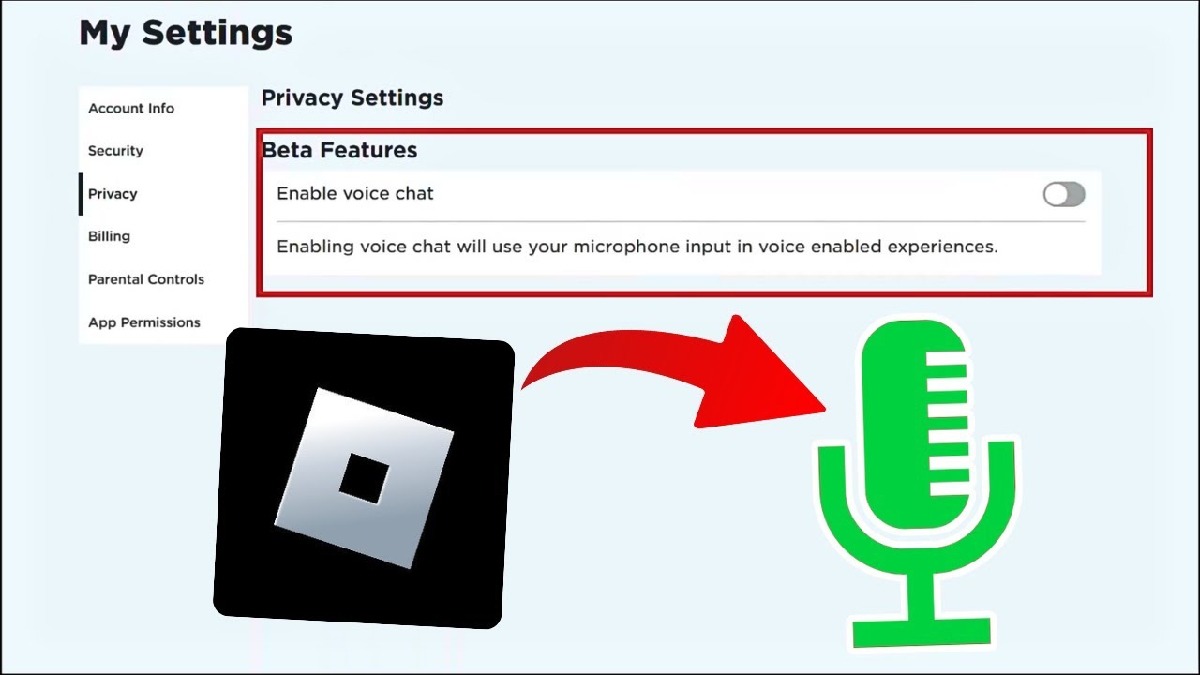
Before discussing how to open mic on Roblox, you need to know the main requirements for the voice chat feature to appear in your account settings.
The following are the Roblox open mic requirements that must be met:
- Minimum age 13 years
Roblox only allows users aged 13 and over to use the Voice Chat feature. If your account is under that age, the microphone option will not appear. - Account has been verified
Eligible users aged 13 years and over must phone number verification or age check to see the Voice Chat option in Communication settings. - Device supports microphone
Make sure your cell phone, laptops, or your PC has a working microphone. Without a microphone, this feature still won't work. - Roblox game supports Voice Chat
Not all Roblox games support the open mic feature. Typically, games with this feature will display a mic icon on the screen.
If all the above conditions have been met, you can proceed to the next stage.
How to Open Mic on Roblox
Now that you've met the requirements, let's get to the heart of the matter: how to open mic on Roblox. Follow these steps carefully:
- Login to your Roblox account
Open the Roblox app or the official website, then log in using your account. - Go to the Settings menu
Click the gear icon in the top right corner, then select Settings. - Open the Privacy or Communication tab
In the settings menu, look for the Communication or Privacy section (depending on the app version). - Enable Voice Chat
Look for the Voice Chat option, then slide the button until it is active. - Allow microphone access
If a mic permission pop-up appears, select Allow. - Enter a game that supports mic
Try entering a game that supports Voice Chat. If successful, a microphone icon will appear above your character or the game screen.
Once the mic is active, you can chat directly with other players in real-time.
How to Verify Roblox 13+
If you can't see the Voice Chat feature, your account likely hasn't been verified yet. Here's how to officially and safely verify your Roblox account for 13+:
- Open Roblox Settings
Log in to your Roblox account, then go to the Settings menu. - Select Account Info
Look for the Account Info section, then click the Verify My Age option. - Prepare official identification
To verify your age, you must be at least 13 years old and have a government-issued photo ID. This can be:- driver's license
- Passport
- Residence permit card
- Another government-issued identification document with your photo on it
- Start the age verification process
You will be asked to start the age verification process by scanning documents and following the camera instructions. - Wait for the verification process
Usually this process only takes a few minutes to a maximum of 1 day.
If verification is successful, the Voice Chat feature will automatically appear in your account settings.
Now you know how to open mic on Roblox, starting from the requirements, activation steps, to the 13+ age verification process.

This feature does make playing Roblox more fun, but please use it wisely and adhere to the community rules.
Also read:
- Delta Executor Roblox: How to Download and Use It
- How to Play Roblox on a Laptop and Its Control Buttons
- What is a Roblox Gift Card? An Explanation and How to Redeem the Code!
If the microphone still doesn't appear, try double-checking your account age, verification status, and microphone permissions on your device. Good luck, and hopefully, it works.
Roblox Product Recommendations


 Hero Alive
 Kumay10shopHero AliveHero Alive
 RudyStorezHero Alive




 News
News




