

- Wipe Data is the deletion of all device information back to factory conditions, including applications, photos, and settings.
- Before doing wipe data, must do backups so that important photos, contacts and accounts are not permanently lost.
- Main functions: restore performance, resolve serious errors, and protect data before the device is sold or handed over.
- Different ways for each system: use Recovery Mode on Android, Settings > Erase iOS, and Recovery > Remove Everything in Windows.
Wipe Data Meaning: Function and How to Do It
For those of you who frequently change devices or do a factory reset when your phone starts to feel heavy, the term... Wipe Data means You've probably heard of this. Unfortunately, many people still think this process only cleans up minor files, but the impact is much greater.
This misunderstanding often leads to people losing important data without realizing it. Photos, contacts, accounts, and even apps can be deleted if you use this method without backing up first.
To avoid mistakes, it is important to understand the meaning of deleting this data completely before using it. With the right understanding, you can know when this process is necessary and how to do it without the risk of losing valuable data.
Also Read:
Understanding Wipe Data
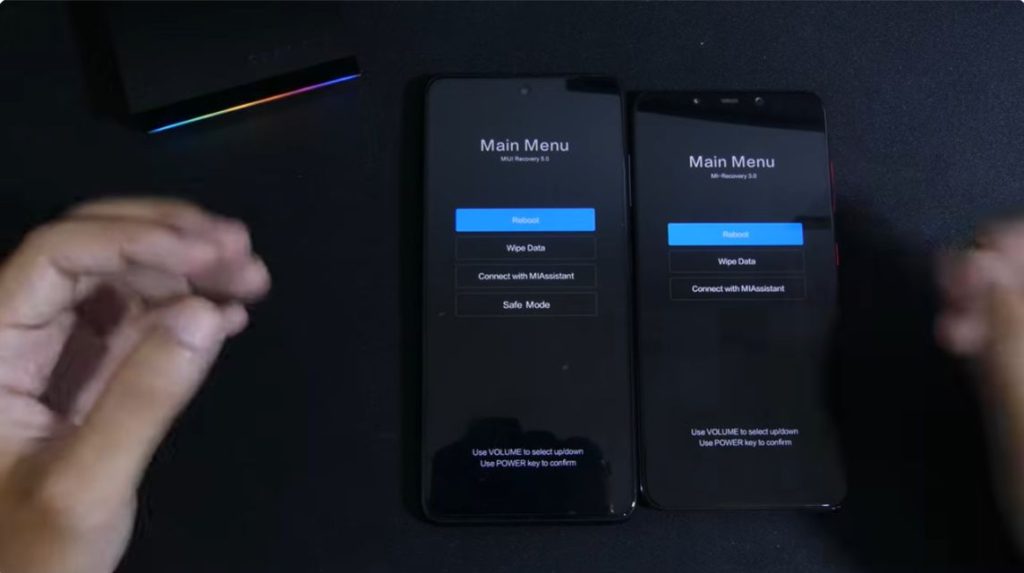
Wiping data is the process of deleting all information stored on a device, returning it to its original state when it was first used. This action not only clears temporary files but also removes personal data, applications, and system settings.
This process is usually performed through the recovery menu or the device's default settings. Once executed, the system will erase all internal memory contents, leaving no previously stored data behind.
Due to its comprehensive nature, this method is often used as a last resort when a device is experiencing problems or before changing hands. Therefore, proper understanding is crucial to avoid data loss.
Before performing this data deletion, the most important step that must not be missed is to back up every file first. This process ensures that important photos, contacts, documents, and accounts remain safe and can be restored after the data deletion process.
Wipe Data Function

One of the functions of wiping data is to restore the device to its initial state to make the system run more smoothly. By deleting all data and applications, the device's performance often becomes more stable than before.
Furthermore, this method is also crucial for troubleshooting device issues that are difficult to repair through standard methods. When a phone frequently experiences errors, crashes, or fails to log in, this method can be a last resort to restore basic functionality.
Furthermore, this data deletion method protects personal data when the device is sold or given to someone else. By completely erasing all information, the risk of data misuse can be significantly minimized.
How to Wipe Data on Android

Create a user Androids Those who want to delete this data can follow the steps below.
- First, the user has to turn off the Android device;
- Then, you can press the volume up button and the “Power” button simultaneously on your Android device;
- Later the user will enter the "Recovery Mode" menu;
- After that, continue by selecting the “Wipe Data” menu (use the volume up or down button, if you are sure, press the “Power” button;
- Users just need to follow all the commands on their cellphone and wait until the process is complete;
- Once the process is complete, the device will immediately be in the main menu or Home section.
- Done and the data has been deleted.
How to Wipe Data on iOS

iOS users can follow the steps below to perform a Wipe Data.
- Open the iOS device, then select and click the “Settings” menu;
- After that, select and click the “General”, “Reset”, and “Erase All Content and Settings” menus;
- If you have, you can enter the device code then continue by clicking the “Erase” menu;
- Done, the data on the iOS device has been deleted.
A Few Extra Tips: Make sure that the user has backed up the data before turning off the Find My feature.

How to Wipe Data on Windows

Here's how to wipe data for Windows devices that you can follow.
- Open the device and select the “Settings” menu;
- Then, select and click the “Update & Security” menu;
- Then, click on the “Recovery” tab;
- After that, continue by selecting and clicking the “Get Started” menu;
- Select and click “Remove Everything”;
- Done and the selected data has been deleted.
Also Read:
That's the discussion about wiping data, starting from the definition to how to do it.
MLBB Product Recommendations


 BV2SHOPBV2SHOPBV2SHOP
 BANGJEFF
 TopMur
 KING OF DIAMONDSKING OF DIAMONDSBV2SHOP
 RudyStorezTopMur




 News
News




