
- Consider risk: is lost Battle Points, tournament opportunities, and the difficulty of finding a new squad.
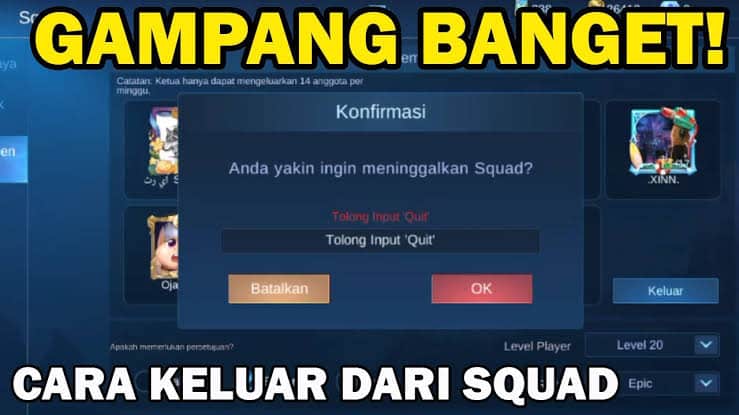
- Exit steps: open Mobile Legends → Squad → squad name → Info → Exit Squad → confirm.
- If you leader, transfer leadership first; cannot rejoin in 24 hours.
- Get out without drama: good communication, don't insult, say thank you, and don't get emotional.
How to Leave ML Squad, Free from Drama
How to leave a squad ML you can do it easily. So you can join another squad or play solo.
You may not be comfortable in one of the squads for various reasons including not being a good fit to play with. So, find a way to leave the ML Squad.
ML Squad it could be a place to have fun, have fun chatting, and push the rankings together. However, there are times when you feel like you don't get along, rarely play games together, or even want to leave ML altogether.
So, leaving the ML squad is actually easy to do. However, there are several steps you need to pay attention to. Come on, check out the tips so you can go out calmly and peacefully!
Also read:
Risks of Leaving the Mobile Legends Squad

Leaving the ML squad is a choice that players can take when they feel they no longer fit into their squad. However, before deciding to leave, it's a good idea to consider the following risks.
Losing Battle Points (BP)
When you leave the squad, you will lose all your skills. Battle Points collected in the squad. This BP is important for purchasing items in the ML shop.
Missed Tournament Chance
Several squads often take part in internal tournaments with attractive prizes. When you leave the squad, you will lose the opportunity to take part in the tournament.
Difficult to Find a New Squad
Finding a new squad that suits your playing style and personality is not easy. You may need a long time to find the right squad.
Branded as a "Traitor"
In some cases, leaving a squad can make you be labeled as a “traitor” by the other squad members. This can cause drama and hostility.
How to Leave Squad ML
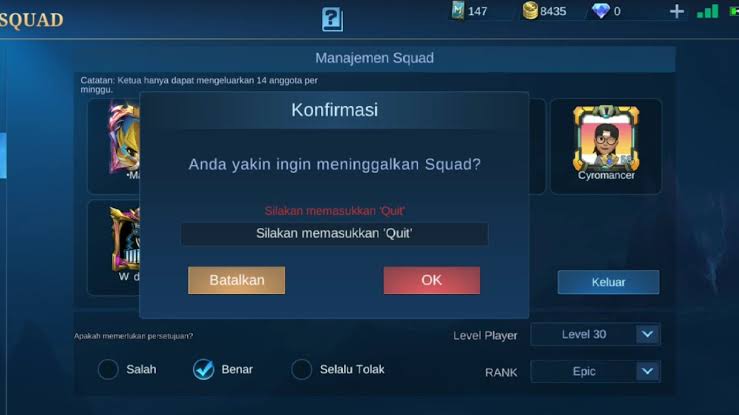
Have you ever felt like you don't fit in with your current ML squad? Or maybe you want to form a new squad with your friends? Whatever the reason, getting out of an ML squad is easy. Here are the steps:
- Open the app Mobile Legends;
- On the main page, click “Squad”;
- Click your squad name;
- Click “Info”;
- Scroll down and click “Leave Squad”;
- Confirm by clicking "Yes".
If you are the squad leader, you need to transfer squad leadership to another member before leaving. You cannot rejoin the same squad within 24 hours of leaving.
How to Create an ML Squad

After leaving the ML Squad, maybe you want to start a new Squad with new members.
If you're unsure how to create a Mobile Legends squad after it's released, it's actually quite easy. You can find out more about how to easily create a Mobile Legends squad below:
- Enter the Mobile Legends game and wait until loading is complete until you are in the lobby;
- Once you arrive at the Lobby, open the Squad menu by pressing the icon of a person with a shield in the bottom right corner;
- Select Create Squad to start creating a new Squad, then fill in the requested data such as Squad Name, abbreviation, and Squad declaration;
- Determine the region or country flag, then complete all the necessary information;
- If so, you can press “Create” to complete the process.
Tips for a Drama-Free Exit

Even though it's easy, there are some tips you can do to make the process of leaving free from drama.
Communicate Well
Before leaving, talk to the squad leader or other squad members. Explain the reason you want to leave politely and clearly.
This is necessary so that when you want to join again you can still be accepted by your squad.
Don't insult or badmouth the squad
Avoid insulting or badmouthing the squad when you are no longer there. This can cause drama and damage relationships with other squad members.
Not only in the game, but your relationships with other squad members in the real world can also be affected, you know!

Get Out Well
Thank the squad members for the opportunity given. Congratulate them and wish them success in the future.
Prepare Yourself for Questions
Chances are, your squad members will ask why you’re leaving. Have a polite and clear answer ready.
Don't be provoked by emotions
If a squad member is angry or disappointed with your decision, don't get emotional. Stay calm and maintain good communication.
Out of the ML squad is not the end of the world. You can still play ML with other friends or form a new squad. The most important thing is that you feel comfortable and happy while playing the game.
Also read:
Well, that was our discussion this time. Hopefully it is useful!
MLBB Product Recommendations

 BV2SHOP
 BANGJEFFBV2SHOPBV2SHOP
 TopMurBV2SHOP
 RudyStorezBV2SHOPRudyStorezTopMur


 News
News




