

- Use asterisks at the beginning and end to create text thick in WhatsApp, so that important messages stand out more.
- Use the underscore sign to crooked and the tilde sign for cross out in WhatsApp, gives emphasis without going into detail.
How to Bold on WhatsApp and Italicize Letters and Numbers
Have you ever wondered how to bold text on WhatsApp to make your messages stand out and not get lost among hundreds of chats? There's a way to bold text on WhatsApp that makes your important information easier to see and pay attention to.
With bold text, your important message will immediately catch the attention of your interlocutor when they're reading the chat. Of course, the bold feature in Whatsapp This is very useful when you want to emphasize the main point in an important conversation.
The good news is, making bold text on WhatsApp is actually very easy for anyone to do without requiring any special technical skills.
In this article, you will learn the complete steps to format bold text in WA quickly and practically.
Also read:
How to Bold on WA
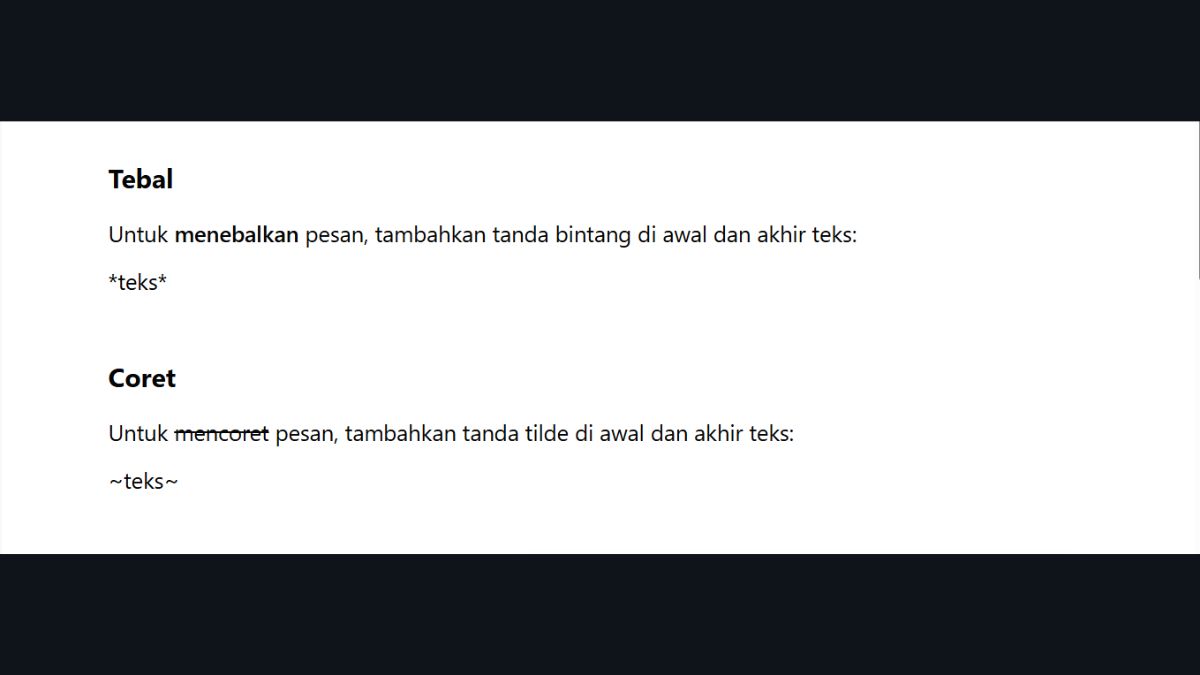
Bolding letters or numbers in WhatsApp is easy, you can follow the steps below.
- Open the WhatsApp application on smartphones You and go to the chat you want to use. Select the contact or group you want to send the message to;
- Type the message you want to bold in the chat box. Make sure there are no extra spaces at the beginning or end of the word you want to format.;
- Add an asterisk (*) at the beginning and end of the word or sentence you want to bold. For example: Important Message;
- Double-check your formatting before sending. Make sure the asterisks are in the correct position;
- Send the message to the selected chat. Once sent, the text will automatically change to bold.
Usually, someone wants to bold the letters in Whatsapp application because to highlight important information, emphasize a message, or make certain sections easier for the recipient to read.
How to Italicize Letters or Numbers in WhatsApp

Apart from bolding letters, you can also italicize letters in WA. Follow the steps below.
- Launch WhatsApp on your phone and open the conversation you want to use. You can choose between a private or group chat, depending on your needs.;
- Write the message you want to italicize. Make sure the message is clear before adding formatting;
- Use an underscore (_) at the beginning and end of the text you want to italicize. For example: Important Message;
- Double-check the placement of underscores to ensure nothing is missing or misplaced. Proper formatting will ensure the text reads as intended;
- Send the message in the chat. Once sent, the text will automatically change to italics.
The use of italics in WhatsApp is usually used to provide subtle emphasis, differentiate terms, or make messages appear more expressive without being too obvious.
How to Strikethrough Letters or Numbers on WhatsApp

Here are the steps to strikethrough letters in the WhatsApp application.
- Open the WhatsApp app and select the conversation you want to use. You can chat privately or in a group, depending on your needs.;
- Enter the text you want to strikethrough in the message field. Make sure the selected word or number is correct.;
- Add a tilde (~) before and after the text. For example: ~Old Price~;
- Double-check the symbol writing to ensure there are no errors or mix-ups. Correct formatting will ensure the strikethrough effect appears perfectly.;
- Send a message to the selected chat. Once sent, the text will appear with a line in the middle.
The strikethrough feature in WhatsApp is typically used to indicate revisions, compare old and new information, or to create a sense of humor in a conversation.

Also read:
By understanding various text formats on WhatsApp such as bold, italics, and strikethrough, you can make your messages clearer, more engaging, and easier to understand.
Using this format also helps emphasize important information without the need for lengthy explanations, making communication more effective and less confusing for the recipient of the message.
MLBB Product Recommendations


 BV2SHOP
 BANGJEFFBV2SHOP
 TopMurBV2SHOPBV2SHOP
 RudyStorezTopMurBV2SHOPTopMur


 News
News




