

- Livery bussid allows players to create bus designs (colors, patterns, logos) to add personalization and a realistic look.
- Follow the installation steps: open Garage → Theme → Livery File → select file → click Install (cost Rp. 15,000 or watch ads).
Collection of the Latest Cool 3D Bussid Livery
For those of you who like playing Bus Simulator Indonesia (Bussid), you must be familiar with the term Livery. So, Livery is a design to identify a vehicle that shows ownership.
You can change and modify your bus livery in the game according to your taste, adding uniqueness and personalization to the bus you drive.
Moreover, currently there is also a Bussid livery that will make the appearance of the bus more realistic and attractive.
Livery Bussid provides the opportunity to create your favorite bus design in the style you want. Starting from color patterns to logos, everything can be customized.
So, if you are looking for it, you are at the right place.
Also read:
Livery bussid
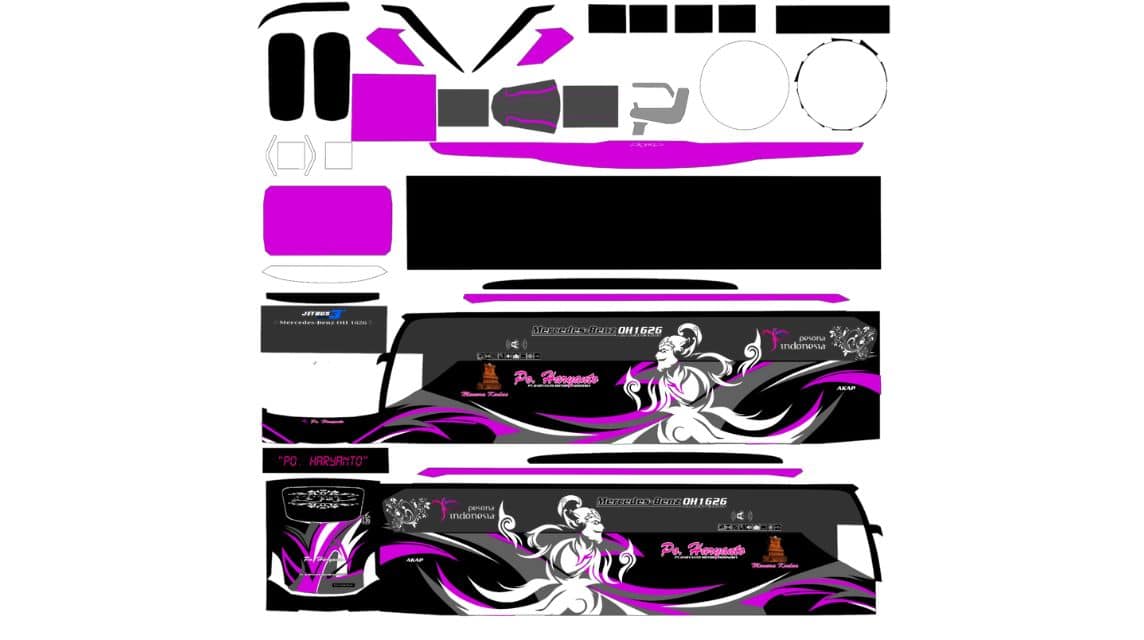
Livery in the context of Bussid is a design or theme that can be changed according to the player's wishes to beautify the appearance of the bus.
This is a way for players to express their creativity by creating or using existing designs. Livery can be a color, pattern, logo, or other image placed on the outside of the bus.
Bussid itself provides many livery options that you can use directly. However, if you feel like you want something more personal or different, you can create your own design or download livery from various sources on the internet.
The most commonly used format is PNG, which allows transparency and good image quality.
Latest Cool 3D Bussid Livery Collection

The following are several recommendations for Bussid livery with HD quality that you can use to beautify the appearance of your bus:
- Livery BUSSID Makmur AKAP Purple XHD
- Livery BUSSID Metro Permai Kemilau Toraja Pink SDD
- Livery BUSS ID Makmur AKAP Purple Voyager Tron XHD
- Livery BUSSID Jetbus 3+ Haryanto Wayang Purple SHD
- Livery BUSS ID Makmur AKAP Purple HD
- Livery BUSS ID Putra Raflesia Deja Vu AKAP SHD
- Livery BUSSID Jetbus 3+ Fitri Trans Pink Fighter SHD
- Livery BUSSID Scania K410 Borlindo Red and White SDD
- Livery BUSSID Jetbus 3+ Subur Jaya SHD Tourism
- Livery BUSSID Indonesian Cross Map Dancer SHD Red Variant
- BUSSID Makmur AKAP Purple Voyager SHD Livery
- Livery BUSSID Sudiro Tungga Jaya Elkusla Elegant XHD
- Livery BUSSID Jetbus 2 Haryanto Simple Premier HD
- Livery BUSSID Jetliner MGI AKAP Bus SHD
- Livery BUSSID Haryanto Gold SR2 Prime XHD
- Livery BUSSID Five Star Express Batman Black SHD
- Livery BUSSID Makmur AKAP Purple SDD
- Livery BUSSID Mira AC Economy Class AKAP SHD
- Livery BUSSID Makmur AKAP Purple Srikandi SHD
- Livery BUSSID Jetbus 3+ Pandawa 87 Euro 5 Real Madrid SHD
- Livery BUSSID Indonesian Cross Map Dancer SHD Green Variant
- Livery BUSSID Makmur AKAP Purple SR2 3D SHD
- Livery BUSSID Jetbus 2 Santoso AKAP Orange 3D XHD
- Livery BUSSID Lima Express Mabar Perdana 3D SHD
- Livery BUSSID Euro 3 Pahala Kencana Executive Class 3D HD
- Livery BUSSID Jetbus 2+ Three Star Tourism 3D SHD
- Livery BUSSID Medal Sekarwangi Ori 3D SHD
- Livery BUSSID Jetbus 3+ Kencana Transindo 3D SDD
- Livery BUSSID Kapuas Raya Express Premium 3D SHD
- Livery BUSSID Primadona Rang Rong Dream Liner SDD 3D
- BUSSID Clear Shark Livery
- Livery BUSSID Roketto Bus 3D HD
- Livery BUSSID Premium Coach SHD Ori
- Livery BUSSID Nakula SHD
- BUSSID Livery Full Glass Stickers
- Livery BUSSID Kapuas Raya Express
- Livery BUSSID Primadona
- Livery BUSSID 3D SHD Agam Tungga Jaya
- BUSSID 3D Livery Sudiro Tungga Jaya Yellow
- Livery BUSSID 3D Rosalia Indah PNG
By using the livery above, you can ensure that the appearance of the bus in the game is cooler and looks realistic. Each livery offers a unique design that can be adjusted to your preferences.
How to install bussid livery

Once you have downloaded the livery you want, the next step is to install it on your bus. Here's how to use the livery easily:
- Open the Bussid Application: Open Bus Simulator games Indonesia that is already installed on your device;
- Select the “Garage” Menu: On the main page, find and select the “Garage” menu on the left side of the screen;
- Enter the "Themes" Menu: On the garage page, select the “Theme” menu which has a picture of a paint palette on top of a bus;
- Select “Livery File”: Here, select the “Livery File” option and then “Device Gallery”;
- Search and Select Livery: Navigate to the folder where you saved the downloaded livery, then select the livery image;
- Install LiveryAfter selecting a livery, click "Install." You can pay the Rp. 15,000 installation fee or watch an ad to get it for free.
- Done :Wait a few moments until the livery is installed. Now, your bus has a cool new look!
By following these steps, you can easily change your bus livery and explore the streets in a more attractive style.
Using the latest Bussid livery is a fun way to add personalization to the Indonesian Bus Simulator game.
With various livery options available, you can choose and customize the appearance of the bus according to your personal style and taste.
Don't forget to always try new designs to make your Bussid playing experience even more exciting and enjoyable. Good luck and hopefully your bus trip will be more interesting!
Also read:
Thus our discussion this time about Livery Bussid Keren. Hopefully useful!
FAQ About BUSSID 3D Livery
BUSSID 3D Livery is a digital skin or sticker in the form of a PNG image that covers the entire bus body (front, sides, rear, and wheels) in the BUSSID game.

You can download the official template and see the complete guide directly on the Livery Edit Tutorial page – Bus Simulator Indonesia.
Mobile phone (HP): You can use applications such as IbisPaint X or Pixellab.
Computer (PC): Can use Adobe Photoshop or CorelDraw.
Open the BUSSID game.
Select the Garage menu.
Select the bus you want to install the livery on.
Click the Palette/Customize icon.
Select Livery File then search for the PNG image file that has been saved on your phone.
Check high resolution if available, then click Install and pay using in-game money or watching ads.
Regular Livery: It's just a combination of plain/flat colors and logos.
3D Livery: Has a shadow effect (shadowing), body lines, realistic light reflections, and accessory details (such as lamp textures or AC grilles) that make it look raised and real.
MLBB Product Recommendations


 BV2SHOP
 DEMPET STOREBV2SHOPBV2SHOP
 TopMur
 RudyStorezBV2SHOPBV2SHOPTopMur
 AM08SHOP


 News
News




