

- Use features Save Video by pressing and holding the screen while playing a video in the application Shopee for quick download to gallery.
- Select button Share then click Save for alternative direct download from the share menu in the app Shopee.
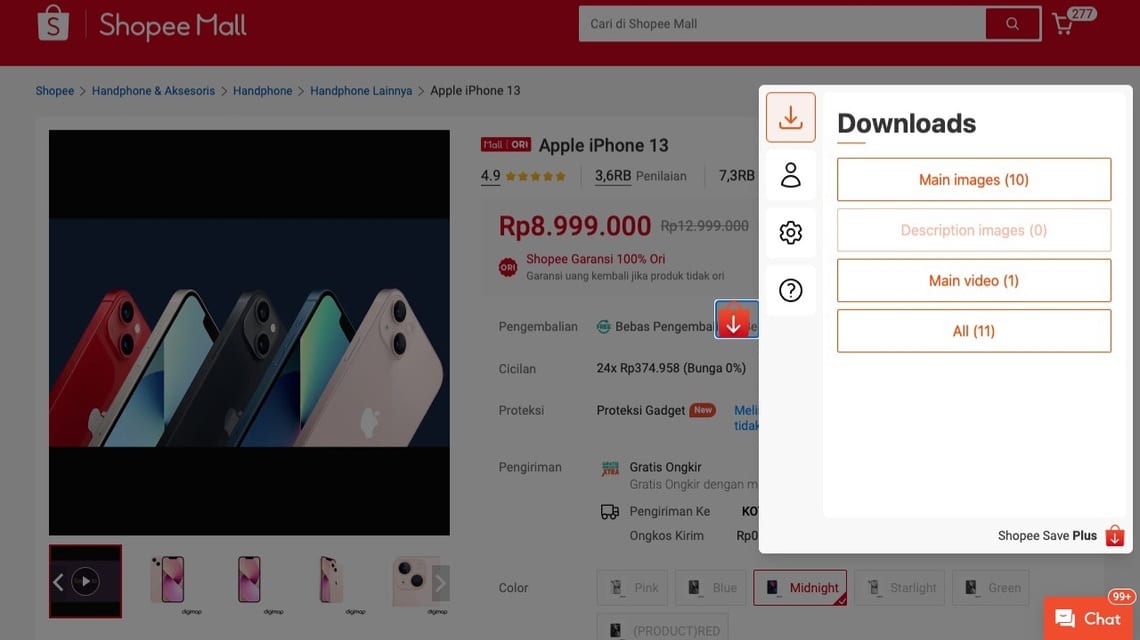
- For results without watermark, install the extension Shopee Save – Download Product Images & Videos in Google Chrome then download from the product page.
How to Download Shopee Videos Without a Watermark, Easy
While you are having fun watching on Shopee Video, there may be one or two videos interesting that you want to download. Shopee Video itself is a feature that allows its users to upload various videos to promote a product.
You don't have to have your own store, you can upload videos with product links from other people's stores.
If another user checks out the product from your video, then you will get some commission. Interesting, right?
For those of you who are interested in creating your own content, you can save videos from Shopee Video quickly! Curious? Let's see the guide in this article!
Also read:
How to Download Shopee Video on Mobile
There are two ways you can do to download Shopee Video from your cellphone, both of which you can practice on Androids nor iOS. Here is the guide:
Download Shopee Video By Pressing The Screen
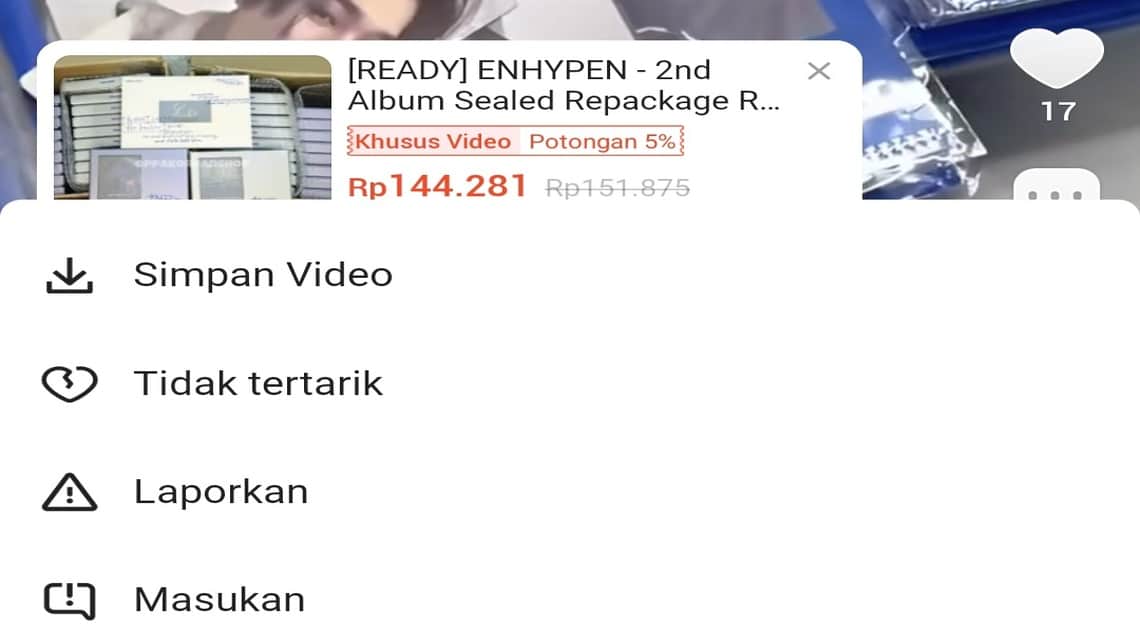
To use this method, first open the Shopee application on your cellphone and select the video you want to download.
Once you have found the video you want, simply press and hold your finger on the screen for a few seconds while the video is playing.
Later, a pop up will appear with several options. Select the “Save Video” menu and wait for the download process to complete. Now you can see the video in the gallery.
Download Shopee Video Via Share Button
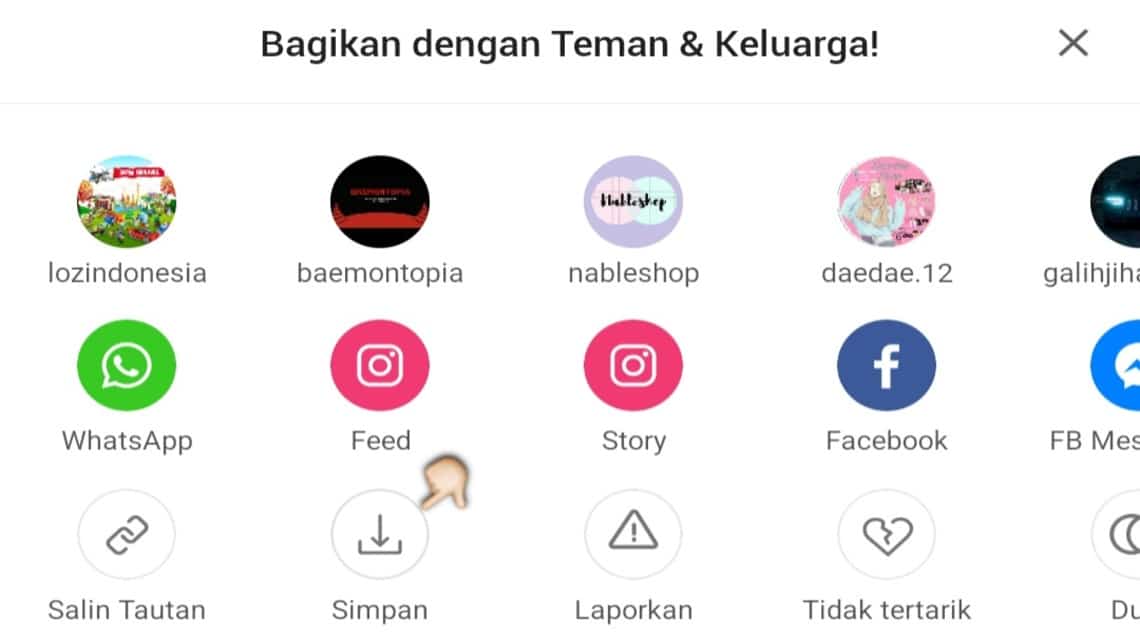
The second way to download videos from the Shopee application is to use the Share button.
Just like the previous method, open the Shopee application and find the video you want to download. Then press the Share menu.
A pop up will appear again, click the “Save” button located at the bottom left of the screen, right next to the “Copy Link” menu.
How to Download Shopee Videos Without Watermark
When you download Shoope Video using the two methods above, the video you download will automatically have watermark.
Watermark is a watermark or marker that can be in the form of writing, a logo, or other image that indicates ownership of a work.
This marker aims to prevent the video from being claimed as belonging to someone else or can also be used as a means of promoting the Shopee platform.
For those of you who want to download videos without watermark From Shopee, you can take advantage of the extension features from Google Chrome.
First, open the Google Chrome browser from the device you are using. It is highly recommended to use a computer or laptop so that the existing features are maximized.
Next, search for “Shopee Save – Download Product Images & Video” and install the extension by clicking the “Add to Chrome” button.
Once the installation process is complete, open Shopee from Google Chrome. Visit the product page you want to download photos or videos from.
The download button will automatically appear when you are on the product page, click the button and wait a few moments for the photo or video to finish downloading.
Finally, you can search for the downloaded video in the “Download” folder. If you haven’t found it, you can type the name of the video in the device’s search field.
Also read:
That concludes our discussion this time regarding downloading Shopee videos, hopefully it's useful!

FAQ About Downloading Shopee Videos
Open the Shopee app, go to the Shopee Video menu, select the video you want to download, then press and hold the screen for a few moments until the save or download option appears.
Go to the product page, click the Share icon, then select Copy Link. Paste the link into a third-party downloader in your browser or use a supported app to save the video to your gallery.
Yes. You can copy the product video or Shopee Video link and then use a third-party downloader or a dedicated plugin like Shopdora to save the video clean and without any watermarks.
Most downloads retain the original resolution of the video uploaded by the seller or creator as long as you use a high-quality link or the app's built-in download feature.
Yes, many Shopee Affiliate creators or resellers download product videos to promote on social media to attract visits or commissions.
MLBB Product Recommendations


 BV2SHOP
 DEMPET STOREBV2SHOPBV2SHOP
 RudyStorez
 BANGJEFF
 TopMurBV2SHOPBV2SHOP
 AM08SHOP


 News
News




