

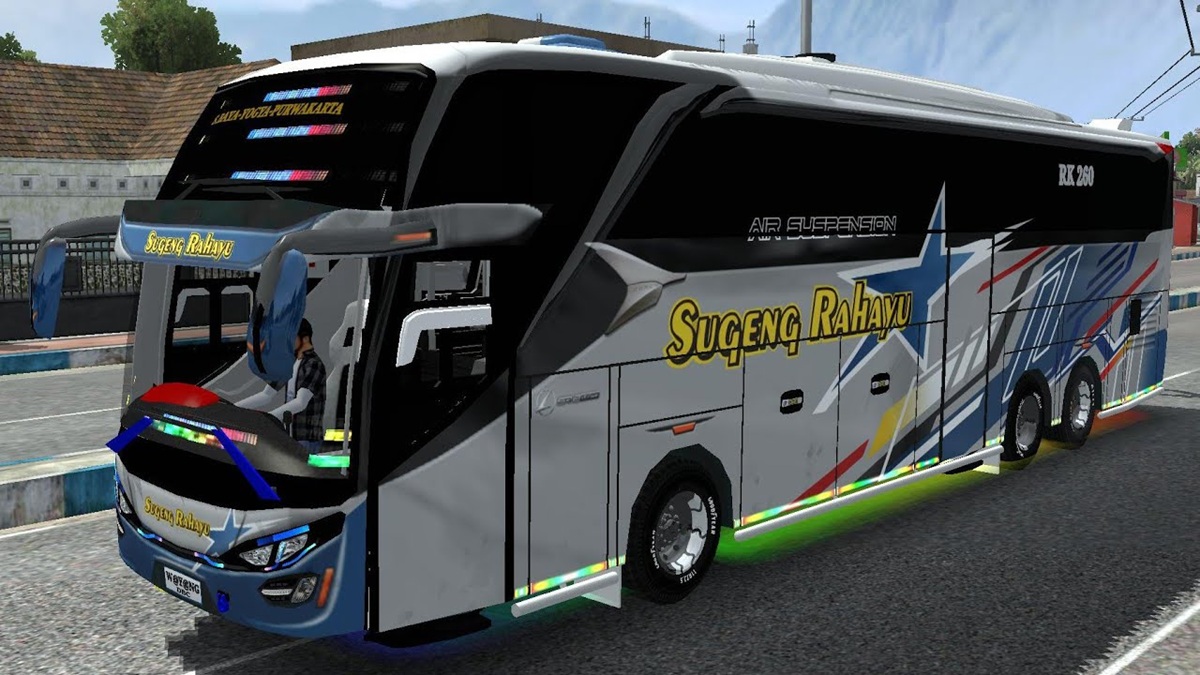
- Livery Sugeng Rahayu make a bus Nakula SHD more realistic; download file PNGs from the community and make sure it fits the template.
- Install via menu Garage in Indonesian Bus Simulator; use high resolution and suitable template to avoid odd cuts or colors.
20 Latest BUSSID Nakula SHD Sugeng Rahayu Livery
The BUSSID Nakula SHD Sugeng Rahayu livery makes the virtual bus look cooler and more realistic. With PO Sugeng Rahayu's signature design, you can customize the Nakula SHD bus's appearance to resemble a real bus operating on Indonesian roads.
To get this livery, you can search for files in the format PNGs through the BUSSID community or trusted livery and mod provider sites. Once the file is obtained, the livery can be easily installed, as long as the image format and resolution match the bus template being used.
Also read:
- 78 Cool and Unique BUSSID Livery Download Links
- 10+ Download Links for ES Truck Simulator ID Livery Wahyu Abadi 02
- 55 Cool and Unique Tunggal Jaya Bus Liveries
BUSSID Nakula SHD Sugeng Rahayu Livery Collection

The following is a collection of BUSSID Nakula livery SHD Sugeng Rahayu which you can use to beautify the appearance of the bus in the game.
- Link 1
- Link 2
- Link 3
- Link 4
- Link 5
- Link 6
- Link 7
- Link 8
- Link 9
- Link 10
- Link 11
- Link 12
- Link 13
- Link 14
- Link 15
- Link 16
- Link 17
- Link 18
- Link 19
- Link 20
You can use the collection of links above as a list to locate available livery download links. Before downloading, ensure the selected file is intended for the Nakula SHD bus to prevent the design from shifting or appearing messy when applied.
Livery with the Sugeng Rahayu theme generally has distinctive characteristics in the form of the bus company identity, certain color combinations, and the PO name being written as an important part of the design.
Therefore, choosing a livery with good image quality can make the bus look more detailed when used for playing.
Additionally, you can customize the livery to suit the Nakula SHD mod you're using. Each bus mod can have a different template, so a livery created for one version might not be compatible with another. If the livery doesn't look right, it's likely that the file you're using doesn't match the bus template.
How to Install the BUSSID Livery
After obtaining the BUSSID Nakula SHD Sugeng Rahayu livery, you'll need to install it in-game to use it while playing. The installation process is quite simple and can be done directly on the device you're using to play BUSSID.
First, make sure you've downloaded the desired livery file and saved it to your device. If the file is in ZIP or RAR format, extract it first using a file manager app. Ensure the extracted file is a PNG image file so it can be used as a livery.
Next, open the Bus Simulator Indonesia game and go to the menu Garage. Select the Nakula SHD bus you want to use, then look for the option to change the livery. Select the PNG file you saved earlier and wait for the installation process to complete.
Once the livery has been successfully applied, inspect the entire bus to ensure the design looks correct. If any parts of the image are cropped, misplaced, or have odd colors, try using a different livery with a template that matches your Nakula SHD mod.
Tips for Installing Livery

To ensure the BUSSID Nakula SHD Sugeng Rahayu livery looks its best, there are a few things you should consider before using it. The following tips can help keep the bus's appearance sharp and its design more realistic when played.
Make sure the image resolution isn't pixelated so the Sugeng Rahayu text is clearly visible. High-resolution files typically produce more detailed images, especially when the bus is viewed up close or when used in certain camera modes.
You can find the raw PNG files for this livery through the BUSSID community or trusted mod provider sites. The raw files can be useful if you want to edit the design yourself using applications like Photoshop or other design applications that support the PNG format.
Besides paying attention to resolution, also ensure the livery file matches the Nakula SHD template you're using. Don't forget to save a copy of the original livery file before editing so you can restore it if the modifications don't meet your expectations.
If you want to create your own design, use visual elements that aren't too busy to keep Sugeng Rahayu's identity clearly visible. Make sure the text, logo, and other details are positioned correctly so they aren't obscured by the bus body or other in-game components.
Also read:
- 12 Cool BUSSID STJ Draka Livery Download Links
- 100+ Most Complete BUSSID Yudistira HD Livery Downloads
- 85 Links to Download the Clear and Cool Sadewa SHD Livery
By choosing the right livery, Nakula SHD's appearance in Bus Simulator Indonesia can be more attractive and give it its own personality. You can also try out several different designs to find the Sugeng Rahayu livery that best suits your playing style.

FAQs
A commonly used file format is PNG.
You can install it via the Garage menu, then select the bus and livery file that you have downloaded.
Livery can look broken if using low resolution or poor quality images.
You can search for it through the BUSSID community or trusted mod provider sites.
Make sure the livery you use has a template that matches the bus mod you are using.
MLBB Product Recommendations


 BV2SHOP
 DEMPET STOREBV2SHOPBV2SHOP
 RudyStorez
 TopMurBV2SHOPBV2SHOP
 AM08SHOPTopMur



 News
News




