
Often we feel anxious to want download IG videos who passed by timeline, but confused about how to keep the results clear.
Indeed, Instagram is a treasure trove of super aesthetic visual content, ranging from short cooking tutorial videos, tips fashion cool ones, to videos of natural scenery that make you calm.
The problem is, Instagram itself doesn't natively provide a "save to gallery" button for other people's content. As a result, many of us take shortcuts by simply... screen record.
In fact, we all know that screen record The results are often disappointing. The image is pixelated, the notification bar is recorded, and the video audio sometimes becomes muffled.
Not to mention the hassle of having to cut (crop) the edges of the video to make it look neat.
Well, this is where Snapgram comes in as a savior for those of you who hate hassle and value original content quality.
The Ultimate Solution for Downloading IG Stories Before They Disappear
One of the most crucial features is the ability to download IG story before the content evaporates into oblivion.
As we know, a Story only lasts 24 hours. After that? It's permanently lost unless the account owner diligently enters it into the column. highlights.
We often see friends or celebrity idols sharing important information or very inspiring photos on their Stories, but we are too late to save them, right?
Using Snapgram for Stories is truly convenient. You don't need additional apps that will just take up your phone's memory.
Just imagine, if every time you want to save a video you have to install With a new application, your phone's internal memory will quickly scream "storage full".
With Snapgram, everything goes above and beyond browsers. You just open it, paste it link, and done.
Not just videos, Snapgram is also very understanding for those of you who like to collect aesthetic photos from other people's Stories.
Usually if we screenshots If the story is in the form of a photo, the quality will decrease drastically due to compression from the cellphone system.
But if you use this tool, the photos you download will remain in JPG format with the original resolution.
So if you want to install it, it will be wallpapers or in-repost repeat (with permission of course), the results are still sharp and not embarrassing.
Why Snapgram?
You might be wondering, “Why not just use an app from the Play Store or App Store?”.
Okay, let's dissect one by one why web-based methods are far superior in 2026:
- Privacy Security Guaranteed: Many third-party applications require you to login Using a personal Instagram account is very risky! Your account could be hacked. hack or shadowbanned because it is considered to be carrying out suspicious activities. On Snapgram, you don't need to login absolutely. No personal data is requested.
- Save Memory & Data: Without installing APKs or apps from the Store, your phone's memory remains free. You also don't need to be diligent. updates applications that are getting bigger and bigger. Just save them bookmark the site is at browsers, and you can access it anytime.
- Anti-Fraud Quality: Many similar sites provide low-resolution downloads. Snapgram is different because it pulls data directly from the source. servers So, if the uploaded video is in 1080p quality, that's what you'll get.
- Watermark Free: Have you ever tried downloading a video and found the app's name written in the corner? It's really annoying, isn't it? Snapgram is free from all that. The video you get is a pure MP4 file without any logos.
Three Steps Sat-Set Instantly Saved
For those of you who don't feel very "techno," don't worry.
The site's interface is designed to be very minimalist, making it easy for even a layperson to understand. Here's how to access it:
- Find the Target: Open your Instagram app as usual. Find the feed video, Reels, or Story you want to save to your gallery.
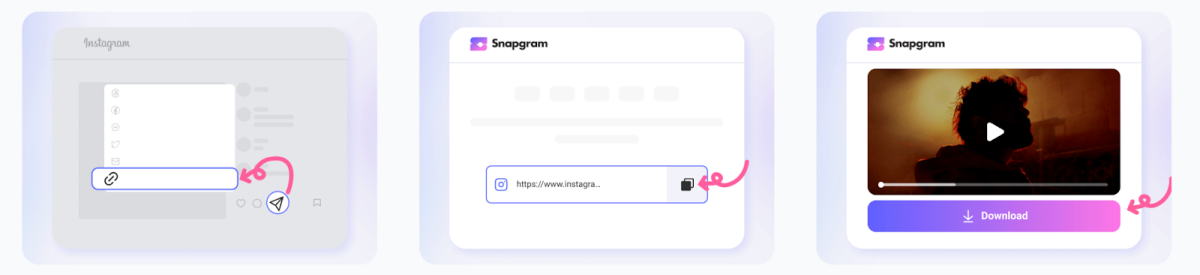
- Get the Link: Click the paper airplane icon (menu) share) in the bottom corner of the content. Look for the option that says "Copy Link." Once the notification appears, link copied, you're halfway there.

- Execution in Snapgram: Open browsers your favorite (Chrome, Safari, or Firefox), then type snapgram.io. On the main page there is an empty box, paste (paste) link there, then press the "Download" button. Wait a few seconds for the video preview to appear, then click it again to save it to your phone.
The process is that fast. No ads. pop-ups that trick you or redirect you to strange sites. Once you click download, the MP4 file will be immediately downloaded to your downloads folder.
All Content Available, From Reels to Carousels
Sometimes we find content in the form of lots of photo slides (carousels).
Usually in the carousel there is a mix of photos and short videos.
What's great about Snapgram is that it can detect all the elements within a single link. You don't have to manually download them one by one.
All slides will be displayed, and you just have to choose which ones are the most important to keep.
What about Reels? Don't worry, Reels is this tool's specialty.
Reels videos, which are now longer in duration, can still be downloaded with synchronized sound.
No more lagging audio or stuck video issues. Likewise, Highlights.
If there is old content that has entered someone's profile, you can still retrieve it as long as the account is not locked (private).
Can be used on all types of devices
No matter you are a loyal iPhone user with a strict iOS system, or an Android user of various brands, Snapgram can run smoothly.
Even if you're just casually browsing your laptop or PC, this method still works. This flexibility is what makes Snapgram a favorite for many.
For iPhone users, files will usually go into the “Files” app under “Downloads”.

You just click on the video, select the share icon, then click “Save Video” so that it appears in the main photo gallery.
For Android users, it's usually much simpler because the video will immediately appear in the Gallery or Google Photos app as soon as the download process is complete.
Conclusion
The digital world moves very quickly. Content that goes viral today may be hard to find tomorrow.
With the help of Snapgram, you no longer need to feel like you're missing out on precious moments or important information shared on Instagram.
Forget the old ways that make you dizzy like screen recording or using apps that are full of annoying ads.
Just visit snapgram.io and make this site your go-to tool.
With a simple process, excellent file quality, and guaranteed security, saving IG videos becomes more enjoyable.
Now, please try it yourself and save your favorite videos to your gallery before they disappear from circulation!
MLBB Product Recommendations


 BV2SHOPBV2SHOPBV2SHOP
 BANGJEFF
 TopMur
 KING OF DIAMONDSKING OF DIAMONDSBV2SHOP
 RudyStorezTopMur



 News
News




