

- Go to Profile then select the tab battlefield and options Replay to see the list of the last 5 matches.
- Save replay to My Replay (maximum 10); replays expire after updates game, monitor the update date.
How to Watch MLBB Match Stories, It's Easy
Even after this game has almost entered its 39th season, there are still many players Land of Dawn out there who don't know how to watch the match story MLBB!
This is understandable, considering this feature is part of the 'meso' feature and won't directly affect player gameplay. So, if you're curious about how it works, check it out!
MLBB Product Recommendations
110 DiamondsMobile LegendsBV2SHOP
IDR 32,0007%Rp. 29,50012 (11+1 Bonus)Mobile LegendsIDR 8,00053%Rp. 3,700568 DiamondsMobile LegendsRp. 170,00013%Rp. 147,200408 DiamondsMobile LegendsIDR 110,0002%Rp. 106,900110 DiamondsMobile LegendsIDR 32,0006%Rp. 29,900296 DiamondsMobile LegendsRp. 105,00025%Rp. 78,10012 DiamondsMobile LegendsIDR 8,00055%Rp. 3,600170 DiamondsMobile LegendsRp. 57,70021%Rp. 45,200110 DiamondsMobile LegendsIDR 32,0007%Rp. 29,700408 DiamondsMobile LegendsIDR 110,0000%Rp. 109,800Also read:





What is Meso?
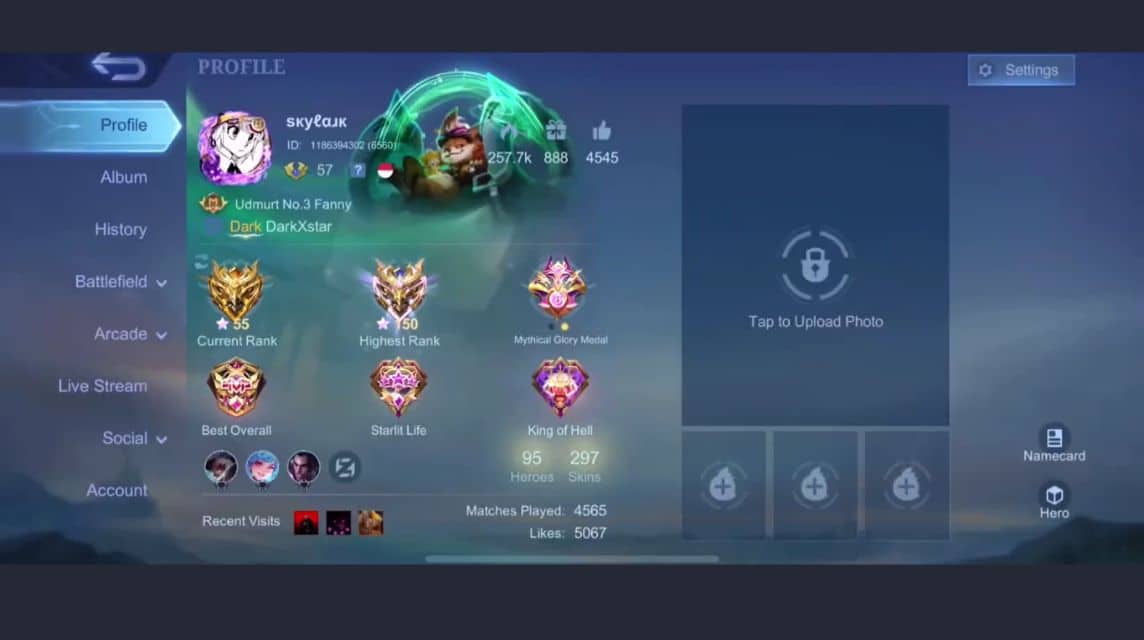
What exactly is a meso? What does it include? Simply put, a meso is a part of the game that doesn't directly affect gameplay.
On that basis, there are not many officers Land of Dawn who understand its existence, let alone its significance. In fact, there are many things involved.
Starting from knowing how to open your own profile or someone else's, how to contact people via inbox, organizing items in your inventory, and other similar things.
Even without knowing how to do any of that, you can still play and win the game, right? Well, it's the same with watching the match story!
How to View MLBB Match Story As Meso
Now, on to the main topic: a step-by-step guide to viewing MLBB match stories. Among the community, comparison stories are better known as 'replays.'
A disclaimer: this tutorial was created using Indonesian language settings. So, to ensure consistency, don't forget to match the language options first.
FYI, Moonton As a developer, we've put a lot of attention into this feature! This is evident in the latest update, which also significantly overhauls the way the app plays replays.
Therefore, it would be a shame if you, as a loyal servant of the Land of Dawn, didn't know how to see it and didn't use it at all, wouldn't it?
You can actually use this feature to view (and even record) various montages you've created. So, to avoid any confusion, here are the steps:
Open profile page

After successfully logging in, you'll be taken to the home page (which displays your hero avatar) by default. From there, you can start by navigating to your profile page.
To do this, simply tap your profile picture in the top left corner. Once opened, you'll see some information, such as your account name, ID, and so on.
Select the 'Battlefield' drop down menu tab

On the left, there are several menu tabs available, starting from 'Album', 'Collection', 'Match Results', 'Social', and 'Account Settings'. Continue by selecting 'Battlefield'.
You'll also notice an arrow symbol on the right side of the menu tab button. So, if you tap this menu, four additional drop-down options will appear.
Ignore the 'Statistics,' 'Favorites,' and 'Credit Score' options. Now you just need to focus on and select the option mentioned above, namely the one labeled 'Replay.'
Select the match you want to replay.

A list of the matches you've played so far will appear. You can replay the last five matches in total; the rest will be automatically deleted.
Hey, don't worry. You can save matches you want to watch later. So, you don't have to hesitate to play for fear of deleting the replay.

Saved matches will appear in the 'My Replays' tab. To watch them, simply tap the camera button at the top of each replay.
You can save a maximum of 10 replays of a match. However, please note that these replays will expire (can no longer be watched) after the game is updated.
This applies to all types of updates, both minor mid-season updates and major ones, such as those during the season change. So, make sure you keep an eye on the update dates!
Also read:
So that was a complete discussion on how to view the match story. MLBBIf you find this article helpful, don't forget to share it on social media and with your friends!



 News
News




